 |
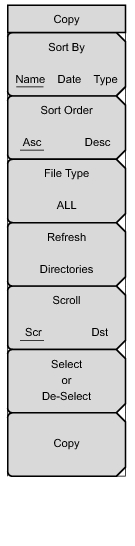
This menu and dialog box is used to copy folders and files. Select folders or files with the Up/Down keys or the rotary knob. Figure: “Two .jpg Files Ready to Copy from Internal Memory to the USB Drive, Jpeg Folder” shows the Copy dialog box with two Jpeg images selected and ready to be copied to the USB flash drive. Highlight a folder and press Enter or the Right arrow key to view the contents.
Press this submenu key to sort file and folder lists by name, by type of file, or by the date that the file was saved.
Displays the folder or file in ascending or descending order based on the selection in the Sort By key.
Press this submenu key to select what type of file to view for copying. The options are: ALL, Measurement, Setup, or Jpeg. The file type can be changed with the Up/Down keys or the rotary knob. Press Enter to make the selection.
Press this submenu key to use the scroll function in the Source Window (Scr - top panel) or Destination Window (Dst - bottom panel). See Figure: “Two .jpg Files Ready to Copy from Internal Memory to the USB Drive, Jpeg Folder”.
Use this key to select or deselect the file(s) or folder(s) to be copied. When selected, a file or folder will be outlined in blue, see Figure: “Two .jpg Files Ready to Copy from Internal Memory to the USB Drive, Jpeg Folder”.
Copies the files or folders selected in the top window to the destination selected in the bottom window. A dialog box will display showing when the copying is complete. If a file with the same name exists in the destination folder a warning box will display to allow file overwrite or to cancel.
|