 |
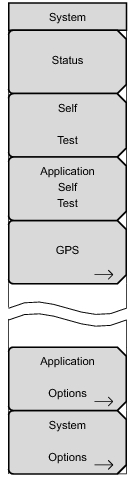
Press this submenu key to display the current system status, including the operating system and firmware versions, temperatures, and other details such as current battery information. Press Esc or Enter to return to normal operation.
Press this submenu key to initiate a series of diagnostic tests that test the components of the instrument. A display lists the individual tests with a pass or fail indication. Press Esc or Enter to return to normal operation.
Press this submenu key to initiate a series of diagnostic tests that are related to the performance of the current measurement mode. A display lists the individual tests with a pass or fail indication. Press Esc or Enter to return to normal operation.
Press this submenu key to open the GSP Menu. Refer to “GPS (Option 31)” for additional information.
Submenu keys are specific to each measurement mode. Please refer to a specific Measurement Guide, as listed in “Measurement Guides”.
|