Key Sequence: Setup
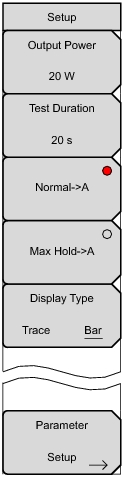 |
Press this submenu key to set the output power level for both carrier frequencies F1 and F2. Options are 20 W (43 dBm), 30 W (45 dBm), 40 W (46 dBm).
Note: Power output value from the Test port is twice the set output value. For example, when Setup > Output Power is set to 20 W. Total output power is 40 W.
40 W = 20 W (F1) + 20 W (F2)
Press this submenu key to set the length of time that the Test Port will deliver power after Measurements > Test is pressed. Range for the test is 1 second to 60 seconds.
Normal‑>A
Press this submenu key to display the current trace sweep, and to repeat the sweep.
Max Hold‑>A
Press this submenu key to display the maximum value for data points from continuous trace sweeps.
Display Type
Trace Bar Press this submenu key to toggle the display of the PIM measurement as a trace or a bar graph. Refer to Figure: Spectral Trace View.
|