Key Sequence: Marker
Press the Marker main menu key to open the Marker menu. The instrument is equipped with six markers. Any or all markers can be employed simultaneously.
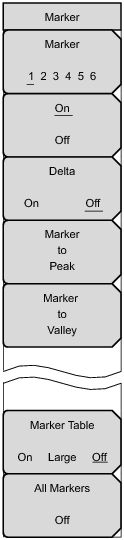 |
Press this submenu key to selects which marker (1, 2, 3, 4, 5, 6) is desired to be active. The underlined marker number is the active marker.
Press this submenu key to turn On or Off the selected (underlined) marker in the Marker submenu key.
Delta
On Off Press this submenu key to turn on a delta marker and to prompt for a delta offset frequency, either positive or negative from the frequency of the currently active marker.
Marker to Peak
Press this submenu key to place the currently active marker on the highest signal amplitude that is currently displayed on screen.
Press this submenu key to place the currently active marker on the lowest signal amplitude that is currently displayed on screen.
Marker Table
On Large Off |