Two types of limit lines can be specified, lower limit lines and upper limit lines. Limit lines can be used for visual reference only or for pass/fail criteria. By using Save‑On‑Event (from Shift (7), for the File menu). a signal that exceeds a limit line can be automatically saved. Refer to your Anritsu handheld instrument User Guide for details.
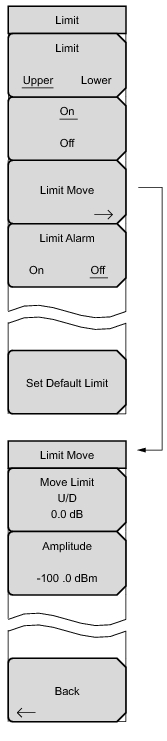 |
Limit
Upper Lower Limit Alarm
On Off Pressing this submenu key sets the default limit line value, which is a limit whose position is 2.5 grid lines from the top of the screen (for the upper limit line) or 2.5 grid lines from the bottom of the screen (for the lower limit line), depending upon which limit is active. The inactive limit line is not altered.
Use this submenu key to move the limit line. Use the keyboard to enter the desired value. The limit line can also be moved by using the rotary knob. Turn the rotary knob clockwise to move the line to higher power levels. The Up/Down arrow keys move the limit line by 5% of the screen height. The Left/Right arrow keys move the limit line by 0.2% of the screen height, or 0.2 dB when the scale is set to 10 dB/division.
Press this submenu key to move the limit line to a specific dBm value. Use the arrow keys, the rotary knob, or the numeric keypad to set the value.
|