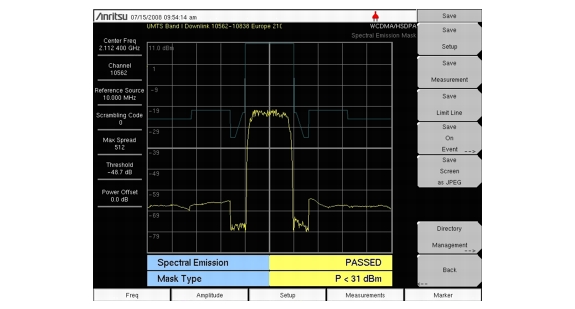
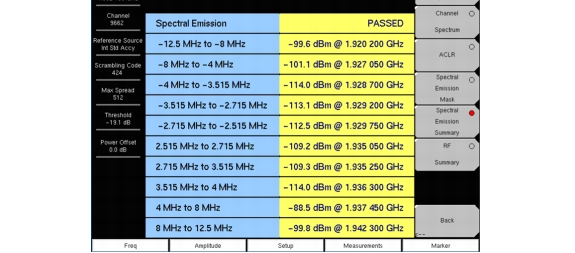
The Spectral Emission Mask displays the selected signal and the mask as defined in the 3GPP specification. The mask varies depending upon the input signal. The instrument also indicates if the signal is within the specified limits by displaying PASSED or FAILED. The emission mask is also displayed in a table format with different frequency ranges and whether the signal PASSED/FAILED in that region.
|
•
|
P ≥ 43 dBm
|
|
•
|
39 ≤ P < 43 dBm
|
|
•
|
31 ≤ P < 39 dBm
|
|
4.
|
Press the Spectral Emission Mask submenu key to activate the Spectral Emission Mask measurement (Figure 3‑5). Press the Spectral Emission Summary submenu key to display the Spectral Emission Summary table (Figure 3‑5).
|
 |
 |