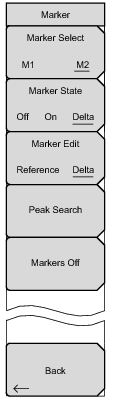
Marker Menu Key Sequence: Marker Available for Channel Spectrum measurements. LTE Marker Menu Marker Select Selects the active marker M1 or M2. The underlined marker is active marker. Each press of the submenu key moves the underline to the other marker. Marker State Sets the state of the selected marker underlined in the Marker Select submenu. Marker Edit Displays when the Market State submenu is set to Delta. Toggles between activating the Reference or Delta marker. Peak Search Moves the selected marker to the trace peak. Markers Off Turns off all markers. Back: Press this submenu key to return to “Measurements Menu” on page 5‑23. Calibrate Menu This menu is not available in LTE measurement mode.