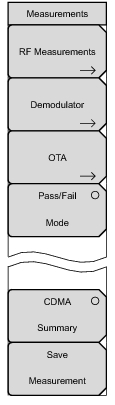
Demodulator: Opens the
“Demodulator Menu” on page 2‑26. In demodulator mode, the received CDMA signal is demodulated. The demodulator has three measurement displays: CDP, CDP Table, and Modulation Summary.
OTA: Opens the
“Over-The-Air Menu” on page 2‑27. OTA displays the CDMA Over-The-Air measurements, which include: Pilot Codes, Ec/Io (dB), Tau, Pilot Power, Channel Power, Pilot Dominance, and Multipath.
Pass Fail Mode: The first press of this submenu key puts the instrument into Pass Fail Mode. The next press of the submenu key opens the
“Pass Fail Mode Menu” on page 2‑29.
CDMA Summary: Displays a summary of all of the CDMA-related numerical measurements in a table format.
Save Measurement: Opens a dialog box to name and save the current measurement. Press Enter to save the CDMA measurement, which is saved with a .cdma extension.