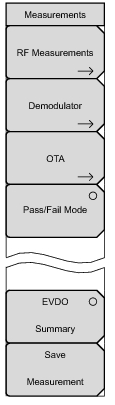
Demodulator: Opens the
“Demodulator Menu” on page 3‑28. The received EVDO signal is demodulated in this measurement. The demodulator has four measurement displays: CDP MAC, CDP Data, MAC CDP Table, and Modulation Summary.
OTA: Opens the
“Over-The-Air Menu” on page 3‑31. OTA displays the EVDO Over-The-Air measurements, which include: Pilot Codes, Ec/Io (dB), Tau, Pilot Power, Channel Power, Pilot Dominance, and Multipath.
Pass/Fail Mode: The first press of this submenu key puts the instrument into Pass Fail Mode. The next press of the submenu key opens the
“Pass Fail Mode Menu” on page 3‑31.
EVDO Summary: Displays a summary of all of the EVDO-related numerical measurements in a table format.
Save Measurement: Opens a dialog box to name and save the current measurement. Press
Enter to save the EVDO measurement, which is saved with an .evdo extension.