Key Sequence: Frequency
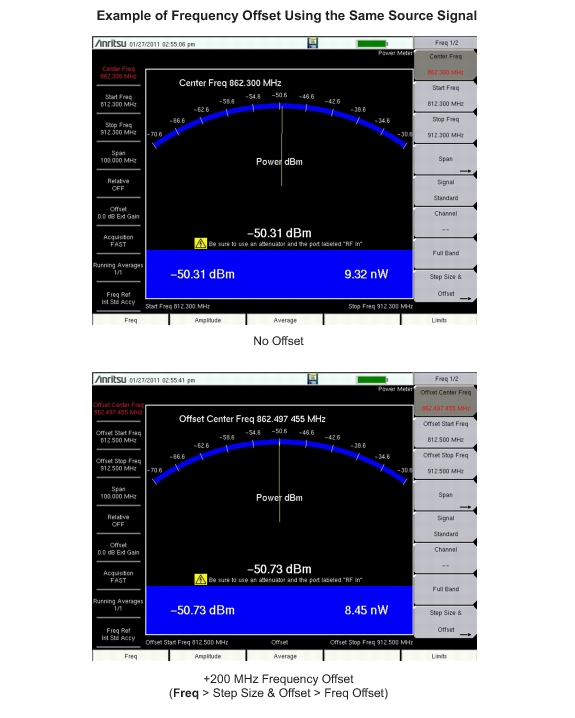
A user defined frequency offset can be entered to adjust the frequency displayed on the instrument from the actual swept frequency. When enabled Offset will be displayed at the bottom of the screen (Figure: 200 MHz Frequency Offset Example) and the Center Freq, Start Freq, and Stop Freq keys will indicate that a frequency offset has been turned on.
|
The Freq Offset will affect the displayed values of Frequencies and Limits. The currently frequency offset value is displayed in the Freq 2/2 Menu.
|
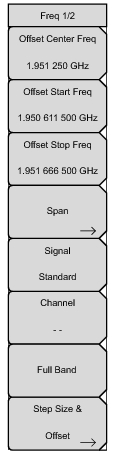 |
Sets the frequency at the center of the measurement. Frequencies can be entered in units of GHz, MHz, kHz, or Hz. Enter the frequency by using the keypad, the rotary knob, or the arrow keys. When the center frequency is entered, the labeling below the analog display shows the center frequency and the span in the most appropriate units based upon the value.
Enter a start frequency by using the keypad, the rotary knob, or the arrow keys. If the entered start frequency is greater than the current stop frequency, then the stop frequency is automatically adjusted to be 1 kHz greater than the start frequency (Min Span).
Enter a stop frequency by using the keypad, the rotary knob, or the arrow keys. If the entered stop frequency is lower than the current start frequency, then the start frequency is automatically adjusted to be 1 kHz less than the stop frequency (Min Span).
Opens the signal standard menu, showing the currently selected signal standard and a complete list of signal standards to choose from.
Sets the channel information for the selected standard. If the particular standard has not been used before, then the channel number defaults to the lowest legal channel number for that standard. If that standard has been used before, then the last used channel will be the default.
Sets the frequency of the unit to a 100 MHz span on the current center frequency.
|
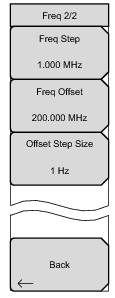 |
Sets the interval that is used by the arrow keys. Enter the step amount by using the keypad, the rotary knob, or the arrow keys.
|
 |