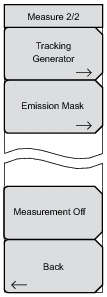
Measure 2/2 Menu Key Sequence: Measure (Shift + 4) > More Measure 2/2 Menu Tracking Generator Press to turn the tracking generator On and Off. The output power is turned on at the level that was previously set with the Output Power submenu key. Emission Mask Press to open the Emission Mask menu. For a description of this menu, refer to the Spectrum Analyzer Measurement Guide (Anritsu part number 10580‑00231). Measurement Off Press to turn off the current measurement. Back Press to return to the Measure menu.