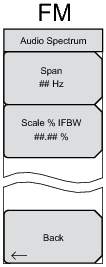
Audio Spectrum FM Menu Key Sequence: Measure or (Shift + 4) > Audio Spectrum > Audio Spectrum Audio Spectrum FM Menu Span Press to set the FM audio spectrum span. Use the numeric keypad, the rotary knob, or the arrow keys to set the value. Valid values are 2 kHz, 5 kHz, 10 kHz, and 20 kHz. Scale % IFBW Press to set the sweep scale in percent of intermediate frequency bandwidth (IFBW). Use the numeric keypad, the rotary knob, or the arrow keys to set the percent value. Back Press to return to the Measurements menu.