 |
This menu and dialog box is used to create folders and select where the Spectrum Master will save the current file. Select folders or drives with the Up/Down keys or the rotary knob.
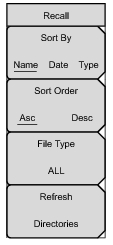
Press this submenu key to sort file and folders by the file name, by the type of file, or by the date that the file or folder was saved.
Displays the folder or file in ascending or descending order based on the selection in the Sort By key.
Press this submenu key to select what type of file is viewed. The options are the ALL, Measurement, or Setup. The file type can be changed with the Up/Down keys or the rotary knob. Press Enter to make the selection.
Setup files contain basic instrument information, measurement mode setup details, measurement marker data, and limit data.
Measurement files contain all of the information in the setup files and the measurement data.
|