Allows users to quickly and easily set the markers and limit line to pre-defined values when dealing with large numbers of traces with similar frequency ranges.
Setting the Preset Buttons
Open a sample trace and set up the desired amount of markers and the limit line where you want them. Press the EDIT Preset Mode button to enter learn mode. Next, press one of the red preset keys to capture the current positions of the markers and limit line. Finally, press the EDIT Preset Mode button again to leave learn mode. The preset keys should return to blue. Now the preset is ready to use.
Using the Preset Buttons
To use the preset limit line and marker values, open a trace with a similar frequency range and of a similar type to the one you used to create the preset. Press the desired preset button and the markers and limit line preset values will be applied to the active measurement plot. If you have multiple measurement plots open, press the right arrow key to go to the next trace and press the desired preset button to apply to the active measurement plot. You can create up to 7 presets for various trace types.
Marker Presets
Edit Preset: When activated, it turns preset buttons 1 through 7 red. Buttons are in learning mode.
Preset Buttons 1- 7: Contain limit line and maker information to be used in similar type measurement plots.
Previous/Next Buttons: Use to scroll through multiple measurement plots before applying preset limit lines and markers.
Saving the Preset Buttons to File
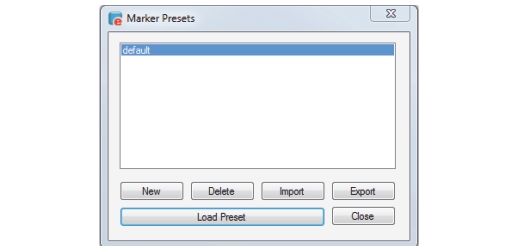
The Presets dialog is used to save preset limit lines and markers to file. This file is saved to a default folder in C:\Program Files\Anritsu\Anritsu Tool Box with Line Sweep Tools\presets. You may save this file or import a previously saved file to a folder of your choice by using the import and export buttons.
Set the limit line and the markers as desired and then follow the above instructions, Setting the Preset Buttons, to set the preset buttons.
Marker Presets
New: Opens the Enter a Preset Name dialog to type a name for a new file to save the current button presets.
Delete: Press to delete the highlighted file from the Presets file list.
Import: Press to load a previously saved file from another folder.
Export: Press to save the current preset file to another folder.
Load Preset: Press to save the current limit line and marker preset buttons to the selected file.