Power flatness is checked by measuring the power level variation during a full band sweep in step sweep mode.
1. Set up the MG362x1A as follows for a step sweep flatness test:
a. Reset the instrument by pressing 3-Line Icon | SETTINGS | RESET |RESET ALL. Upon reset, the FREQUENCY menu is displayed with frequency and set to default values.
b. Press FREQUENCY button to open the current frequency parameter for editing.
d. In the same menu screen, press the LEVEL button to open the current parameter for editing and set LEVEL to the maximum specified noted in the data sheet (use a fixed attenuator when measuring s above +19 dBm).
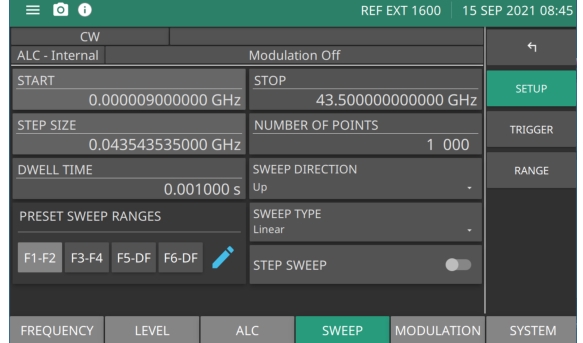
e. Press SWEEP | STEP to show the step sweep menu as shown below.
Step Sweep Setup Menu
f. Set START to the lowest frequency of the instrument and set STOP to the highest frequency of the instrument for a full frequency sweep.
g. Set the DWELL TIME to 1 second, or to a time that is comfortable between recordings.
h. Set the NUMBER OF POINTS to 100.
2. Press the TRIGGER menu.
3. Press TRIGGER SWEEP button to start a sweep.
4. As the MG362x1A steps through the full frequency range, observe the maximum and minimum power meter readings and record the values on the test record.