 |
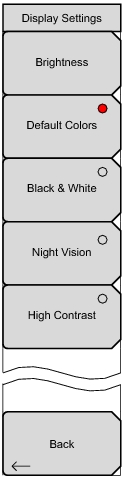
The brightness of the display can be adjusted to optimize viewing under a wide variety of lighting conditions. Use the keypad, the Up/Down arrow keys or the rotary knob to select a brightness level from
1 to 9, with 9 being the brightest. Press Enter to accept the change. Sets the display colors to their factory default condition. Used for normal viewing.
Sets the display colors to black and white. Used for printing and viewing in broad daylight conditions.
Increases the contrast of the default display colors. Used for other challenging viewing conditions.
|