 |
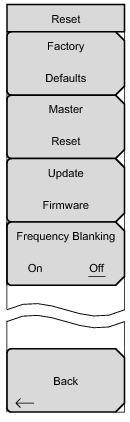
Factory Defaults
Press this submenu key to restore the Spectrum Master to its factory default parameter values and Mode settings, including Ethernet, language, and brightness settings. Press the Enter key to initiate the reset. The Spectrum Master is automatically rebooted as part of this operation. To return to normal operation without resetting, press Esc rather than pressing Enter.
Note: This same reset sequence can be initiated when turning the Spectrum Master On by pressing and holding the Esc+On keys until the Anritsu splash screen is displayed.
Master Reset
Press this submenu key to restore the factory setting to all system parameters, including Ethernet, language, and brightness settings. Also, all user files in the internal memory are deleted, and the original language and antenna files are restored. Press the Enter key to initiate the reset. The Spectrum Master is automatically rebooted as part of this operation. To return to normal operation without resetting, press Esc rather than pressing Enter.
Note: This same reset sequence can be initiated when turning the Spectrum Master On by pressing and holding the System (8)+On keys until the Anritsu splash screen is displayed.
Press this submenu key to update the instrument operating system using an external USB drive. Press Enter to begin the update, or press Esc to return to normal operation without updating. Refer to “Update Firmware” for additional information.
Frequency Blanking On/Off (Option 7 Only)
The Frequency Blanking submenu only displays when Option 7, Secure Data is installed on the Spectrum Master. When Frequency Blanking is turned On, all frequency values that are displayed on the screen and menu buttons are replaced with ##.#####. This security measure allows the use of the instrument without sensitive frequency information being displayed on the screen.
Setting Frequency Blanking to Off will preset the instrument settings and frequencies to the factory default settings (the current frequency settings will not be saved or displayed on the instrument).
|