The instrument can be operated while in the soft carrying case. On the back of the case is a large storage pouch for accessories and supplies.
|
1.
|
The front panel of the case is secured with hook‑and‑loop fasteners. Fully close the front panel of the case. When closed, the front panel supports the shape of the case while you are inserting the Spectrum Master.
|
|
2.
|
Place the soft carrying case face down on a stable surface, with the front panel fully closed and laying flat.
|
|
Two zippers provide access around the back of the case. The zipper closer to the front of the case opens the case back, and allows access to install and remove the instrument. The zipper closer to the back of the case opens a support panel that can be used to provide support for improved stability and air flow while the instrument is in the case. This support panel also contains the storage pouch.
|
|
4.
|
Insert the instrument face down into the case, taking care that the connectors are properly situated in the case top opening. You may find it easier to insert the connectors first, then pull the corners over the bottom of the Spectrum Master.
|
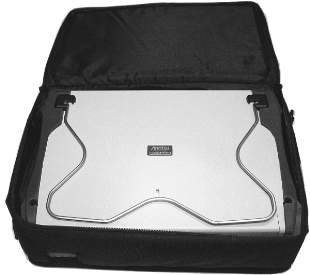 |
The soft carrying case includes a detachable shoulder strap, which can be connected to the D‑rings on the upper corners of the case, as required for comfort or convenience.
The attached Tilt Bail can be used for desktop operation. The tilt bail provides a backward tilt for improved stability and air flow. To deploy the tilt bail, pull the bottom of the tilt bail away from the back of the instrument. To store the tilt bail, push the bottom of the bail towards the back of the instrument and snap the bail into the clip on the back of the instrument.