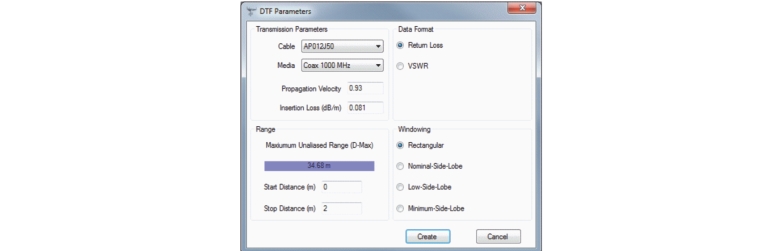
Distance to Fault (DTF) converts a previously saved Cable Loss plot, Return Loss (frequency domain) plot, or a VSWR (frequency domain) plot into a Distance to Fault plot. Click Distance to Fault in the Tools menu or press the Distance to Fault button on the Tools Toolbar.
DTF Parameters
Transmission Parameters
Cable:
1. Press the down arrow on the list box.
2. Select a cable from the list.
Media:
1. Press the down arrow button on the list box.
2. Select the coax type from the list or enter the values for Propagation Velocity and Insertion Loss
Range
The highlighted field indicates the Maximum Unaliased Range (D-Max) is the maximum allowable stop distance that can be entered into the Stop Distance (m or ft) parameter setting.
Enter the start and stop distances for the measurement.
Data Format
Select either Return Loss or VSWR as the data format.