 | |
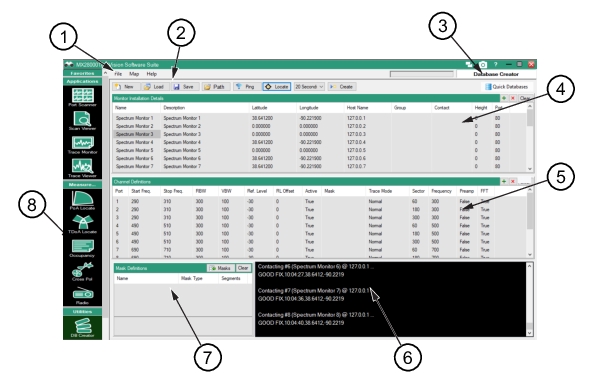
1. Menu Bar 4. Monitor Installation Window | 8. Database Creator Icon |
| |
1. Menu Bar 4. Monitor Installation Window | 8. Database Creator Icon |
Icon | Description |
 | New Creates a new database file in a specified path. |
 | Load Loads an already saved database definitions file (.def). |
 | Save Saves a database definition file (.def). |
 | Path Sets the location where the database will be created. |
 | Ping Pings all monitors. |
 | Locate Gets GPS coordinates for all monitors. |
 | Sweep Rate Selects the monitor installation sweep rate. |
 | Create Creates the database file using parameters set by Path and New icons. |
 | Create & Open Creates the database and opens it in the trace monitor window. |
 | Quick Databases Adds spectrum analyzers and Channels. Submenus include: Add spectrum analyzers • Load from List • Load from Database • Create From Pattern • Search Local Network Add Channels submenu: Set the Channel Definitions • Single Channel – Omni • Single Channel – Sectors • WiFi Bands • Capture from single analyzer • Capture from each analyzer For details on the Quick Databases submenus, see Quick Databases Button. |