 |
|
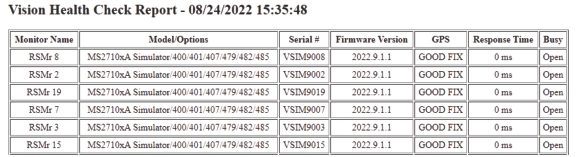
Column Name | Description |
Monitor Name | A list of the active Spectrum Analyzer names from the Remote Monitor List. The order of the Spectrum Analyzers listed appear in the order they respond to the Health Check ping. |
Model/Options | A list of the spectrum analyzer model number and the options installed in each Spectrum Analyzer. |
Serial Number | A list of the Serial Numbers that identify each Spectrum Analyzer. |
Firmware Version | A list of firmware versions of each Spectrum Analyzer. |
GPS | A list that displays the GPS connection status. Good Fix indicates the Spectrum Analyzer is connected to GPS. NO Fix indicates the GPS connection is poor or none. |
Response Time | A list of the Monitors Response Time. Typically in the 10s to 100 ms. |
Busy | A list indicating if Monitor is available for remote control: Open: indicates available, Busy: indicates someone else is using the spectrum analyzer, Error: indicates the spectrum analyzer did not respond, likely it is off-line. |