Local Measurement Folder
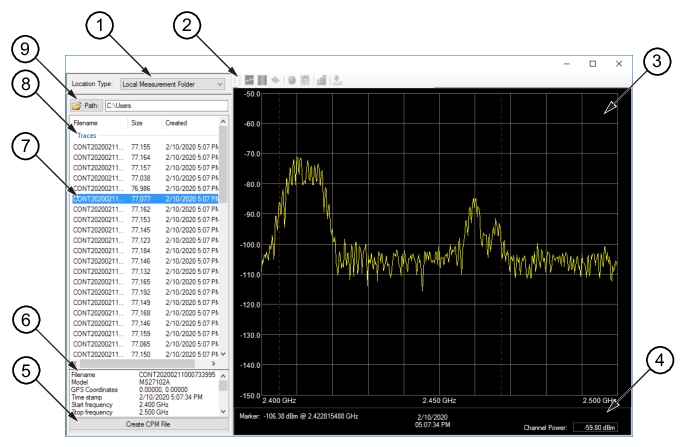
The Log Measurement Folder view is shown in
Figure: Log Measurement Folder View.
Local Measurement Folder
User selected view. Click or type a path to navigate to the folder that contains spectrum analyzer files.
Toolbar
Not active in Local Measurement view.
RF Sweep Screen
Shows the selected spectrum analyzer file RF sweep view.
Status
Shows the RF sweep date and time collected, Channel Power, Marker and Delta Marker details when the markers are active.
Create CPM File Button
Converts the spectrum analyzer file to a CPM file.
Spectrum Analyzer Details
Displays the spectrum analyzer details of the selected file.
User Selected File
Click highlights the spectrum analyzer file to view.
File Folder Window
Displays the files of the opened spectrum analyzer folder.
File Browse
Click to browse or type a path to locate the folder which contains supported measurement files.