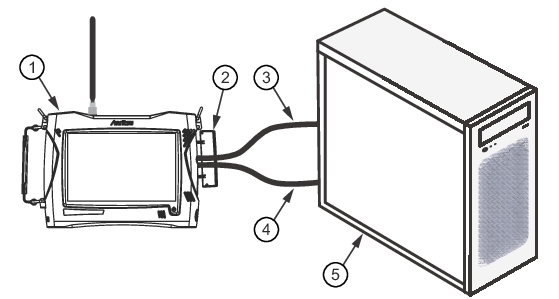
2. Open the side cover of the MS2090A to locate the Data Out and Ethernet ports.
3. Use a PCIe nano pitch cable to connect the MS2090A Data Out port to the PCIe expansion card port on the Personal Computer.
4. Use an Ethernet cable to connect the MS2090A Ethernet port to the Personal Computer.
MS2090A PCIe Connection
1. MS2090A Spectrum Analyzer
2. Side Cover
3. Ethernet Cable
4. PCIe Nano Pitch Cable
5. Personal Computer
Connect the MS27201A
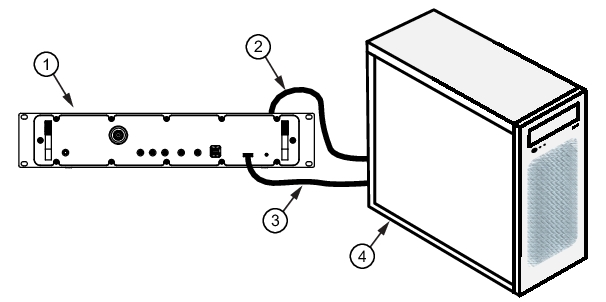
1. Locate the Data Out port on the front panel of the MS27201A.
2. Use a PCIe nano pitch cable to connect the MS27201A front panel Data Out port to the PCIe expansion card port on the Personal Computer.
3. Use an Ethernet cable to connect the MS27201A rear panel Ethernet port to the Personal Computer.
MS27201A PCIe Connection
1. MS27201A Spectrum Analyzer
2. Ethernet Cable
3. PCIe Nano Pitch Cable
4. Personal Computer
For low speed IQ acquisitions, data can be transferred through just the Ethernet cable. Once the connections are made, turn on the analyzer and wait for it to start sweeping and then turn on the PC. Proceed to Figure: Installing MX280005A.