IQ Signal Masterâ„¢ MX280005A Vector Signal Analysis Software : Analysis Mode : Send SSB to Signal Analyzer
 
Send SSB to Signal Analyzer
When the SSB has been identified, it is ready to be sent to a spectrum analyzer to be demodulated.
Connect to Analyzer
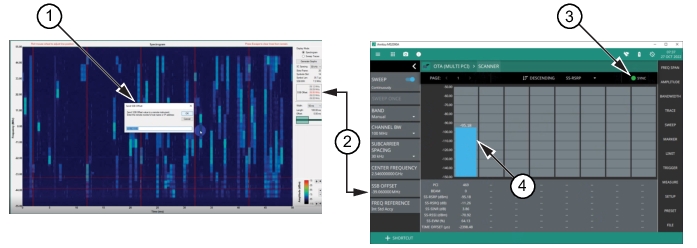
Send the SSB signal to the analyzer to demodulate as shown in Figure: SSB Offset Captured on Analyzer.
SSB Offset Captured on Analyzer
1. Send SSB Offset dialog.
2. SSB Offset sent from 5G frame analysis program to spectrum analyzer.
3. Sync indicator
4. SSB Offset Signal captured on the MS2090A and the power strength is indicated at the top of the power bar.
Send SSB
1. Click the SSB Offset value. A SSB Offset IP address dialog is shown in the spectrogram window.
2. Enter the IP address of the Spectrum Analyzer into the Send SSB Offset dialog.
3. Watch the MS2090A SYNC indicator. If it is red, the SSB is not synced. When it turns a solid green
(not blinking), the SSB is synced and the power level is displayed on the MS2090A.
4. The signal is ready for demodulation with the MS2090A spectrum analyzer.
For more on the MS2090A and 5GNR measurements, visit the Anritsu website at: https://www.anritsu.com/en-us/ and search for the MS2090A product page.