Rubidiumâ„¢ MG362x1A SeriesLow-Noise RF/Microwave SignalGenerators : Instrument Overview : SYSTEM INFORMATION Menu
 
SYSTEM INFORMATION Menu
The System Information screen provides current status of the Instrument, Software, and Connectivity.
INSTRUMENT Menu
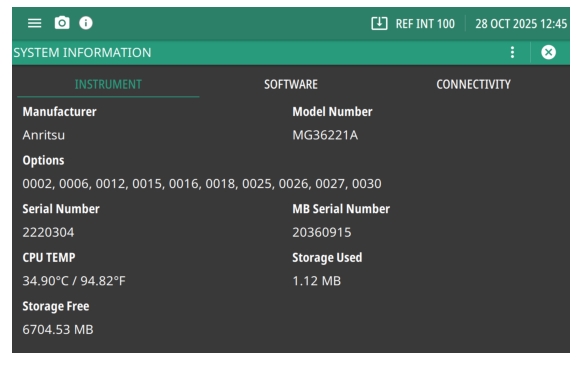
The INSTRUMENT menu is shown in Figure: INSTRUMENT Menu.
Press: 3-Line Menu| SYSTEM INFORMATION
INSTRUMENT Menu
Manufacturer
The manufacturer name: Anritsu.
Options
Displays the options that are installed.
Serial Number
The serial number of the instrument.
CPU Temperature
Displays the current instrument internal CPU temperature.
Storage Free
How much instrument internal CPU free storage is available.
Model
The model of the instrument.
MB Serial Number
The motherboard serial number.
Storage Used
The amount of CPU storage used.
SOFTWARE Menu
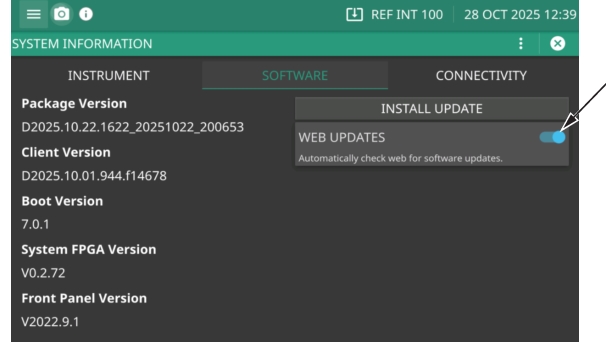
Click SOFTWARE to view the screen shown in Figure: SOFTWARE Menu.
SOFTWARE Menu
Package Version
Displays the current version software installed.
Boot Version
Provides the boot version.
Front Panel Version
Provides the front panel software version.
Client Version
Provides the client version.
Web Updates
Automatically checks for the latest software updates on the company website.
 
 
CONNECTIVITY Menu
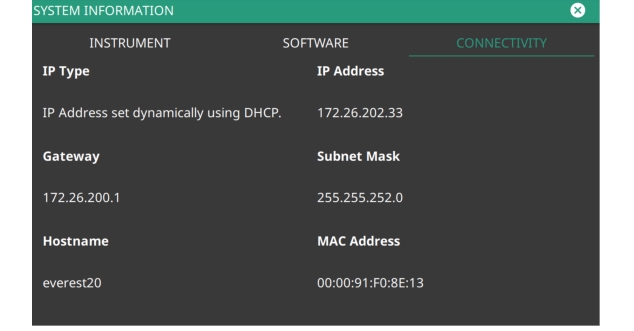
Click Connectivity to view the network settings screen shown in Figure: CONNECTIVITY Menu
CONNECTIVITY Menu
IP Type
There are two primary types of IP address formats used today, IPv4 and IPv6
Gateway
A TCP/IP network can have a gateway to communicate beyond the LAN identified by the network ID. A gateway is a computer or electronic device that is connected to two different networks and can move TCP/IP data from one network to the other. A single LAN that is not connected to another LAN requires a default gateway setting of 0.0.0.0. If you have a gateway, then the default gateway would be set to the appropriate value of your gateway.
Hostname
A Hostname is a label assigned to a device (a host) on a network. It distinguishes one device from another on a specific network or over the Internet.
IP Address
Every computer and electronic device in a TCP/IP network requires an IP address. An IPv4 address has four numbers (each between 0 and 255) separated by periods. For example: 128.111.122.42 is a valid IP address.
Subnet Mask
The subnet mask distinguishes the portion of the IP address that is the network ID from the portion that is the station ID. The subnet mask 255.255.0.0, when applied to the IP address given above, would identify the network ID as 128.111 and the station ID as 122.42. All stations in the same local area network should have the same network ID, but different station IDs.
MAC Address
An Ethernet address, or Media Access Control (MAC) address, is a unique 48-bit value that identifies a network interface card to the rest of the network. Every network card has a unique Ethernet address permanently stored in its memory.