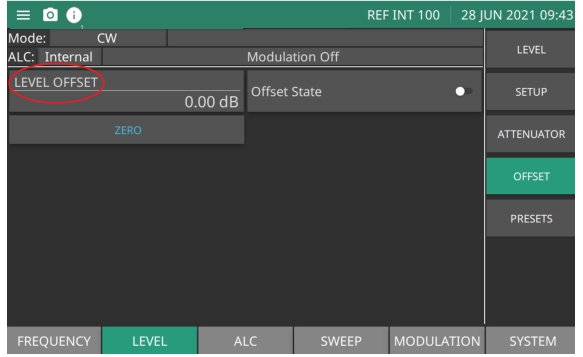
The Level OFFSET menu provides a means to compensate for a test device on the signal generator's RF output at a point of interest. For example, the power level at the test device may be less or more than the displayed power level because of the loss through an external transmission line or the gain of an amplifier located between the MG362x1A RF output and the test device. Using the level offset function, you can apply a constant to the displayed power level that compensates for this loss or gain. The displayed power level will then reflect the actual power level at the test device. The OFFSET menu provides power level adjustment for a device on the signal generator's output. The Offset menu is shown in Figure: OFFSET Menu.
Press: LEVEL | OFFSET
OFFSET Menu
LEVEL OFFSET
The level offset parameter adjusts the displayed output level of the instrument. It does not affect the actual output level. Output level offset range: –100 dB to 100 dB
Offset State
Level offset state On/Off. Allows the user to turn on/off the offset without having to change the offset parameter.
ZERO
Set offset to zero.
Edit the Offset Value
Enter an offset value and apply it to the displayed power level.
Press: LEVEL | OFFSET
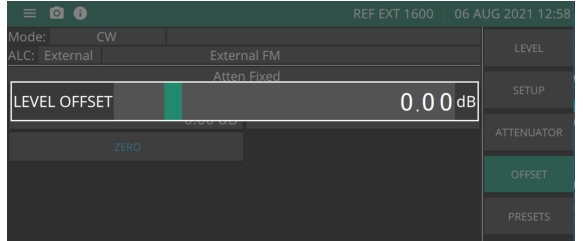
Then press the LEVEL OFFSET parameter button. This opens the offset parameter for editing as shown in Figure: Edit Level Offset.
Edit Level Offset
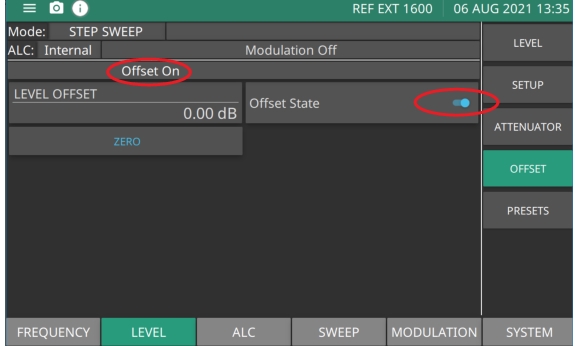
Edit the current offset value using the cursor control keys, rotary data knob, or enter a new offset value using the keypad and appropriate termination soft key. Switch the Offset State on to apply the offset to the displayed power level. When Offset State is selected on, the message Offset On is displayed on the menu bar to remind you that a constant offset has been applied to the displayed power level as shown in Figure: Level Offset On.
Press ZERO to set the level offset to zero.
Press Offset State again to switch offset off. The Offset On message will disappear from menu bar.
Level Offset On
Step Attenuator (Option 2)
With step attenuators, the ALC and attenuator work in conjunction to provide leveled output power up to –110 dB. In the normal (coupled) leveling mode, when the desired power level is set, the correct combination of ALC level and attenuator setting is determined by the instrument firmware. In some applications, such as receiver sensitivity testing, it is desirable to control the ALC level and attenuator setting separately by decoupling the step attenuator from the ALC.
ATTENUATOR Menu
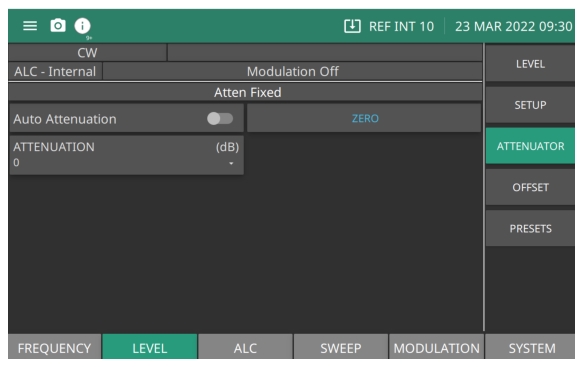
In MG362x1A signal generators equipped with Option 2 step attenuators, the ALC and attenuator work in conjunction to provide a leveled output power range of –130 dB. The Attenuator menu is shown in Figure: Attenuator Menu. For more on power leveling and step attenuator settings, see Power Level Operation.
Press: LEVEL | ATTENUATOR
Attenuator Menu
Auto Attenuation
Toggles between coupled and decoupled attenuation mode. Turning on the toggle couples the step attenuator to the ALC system; setting off decouples the step attenuator from the ALC system. Notice that Atten Fixed status is displayed on the top as shown in Figure: Attenuator Menu when Auto Attenuation toggle is turned off.
ATTENUATION
Applies only to instruments equipped with an internal step attenuator Option 2. The attenuation drop-down is enabled only when the Auto Attenuation toggle is turned off. The step attenuator can be set in10 dB increments.
ZERO
Set the attenuation to 0 dB. Only available in decoupled attenuation state achieved by turning off the Auto Attenuation toggle.