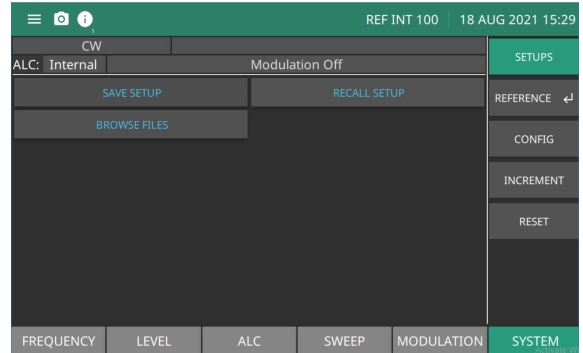
The SYSTEM menu provides the capability of browsing, saving, and recalling measurement or setup files.
SETUPS
Using SYSTEM SETUPS menu you can save, recall the setup files in addition to browse the internal files saved in the instrument.
SAVE SETUP
Once you have decided that an instrument setup should be retained for future use, press: SYSTEM | SAVE SETUP to save the current setup file onto instrument’s internal memory.
RECALL SETUP
To recall a previously saved setup:
1. Press SYSTEM |RECALL SETUP.
2. Select the file and Click Open.
The MG362x1A sets itself to the recalled configuration.
The reference calibration function provides calibration of the internal 10 MHz (Option 3) or 100 MHz references of the MG362x1A using an external 10 MHz, 0 to +10 dBm reference signal. (References available are Option dependent)
100 MHz
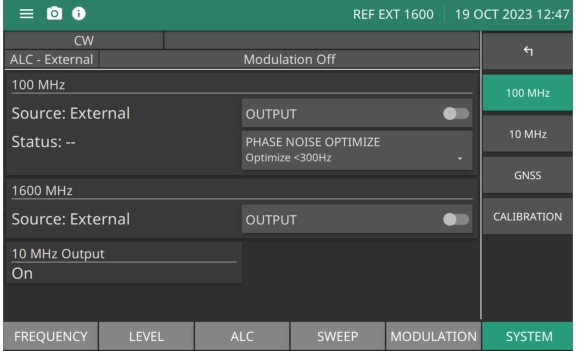
The 100 MHz menu is shown in Figure: 100 MHz Menu. To calibrate the 100 MHz reference, see 100 MHz Calibration (Standard Reference). The menu display depends on the options ordered and external reference inputs. The menu below is the standard reference menu.
Press: SYSTEM | REFERENCE
100 MHz Menu
SOURCE
Displays the 100 MHz reference source. The 100 MHz output to the rear panel BNC is active when the Output button is toggled on.
STATUS
Displays the reference oscillator lock status of the 100 MHz source. See 100 MHz Status.
1600 MHz SOURCE
Displays the 1600 MHz reference source and status. The 1600 MHz output to the rear panel BNC is active when the Output button is toggled on.
10 MHz Output
The 10 MHz to the rear panel is set to on. There is no switch.
100 MHz OUTPUT
Switch the 100 MHz reference on or off.
PHASE NOISE OPTIMIZE
Switch the 100 MHz reference bandwidth between wide and narrow. Optimize <300 Hz: Wide = Low Offset Phase Noise, nominal, optimize for < 300 Hz Optimize >300 Hz: Narrow = High Offset Phase Noise, optimize for > 300 Hz
1600 MHz OUTPUT
Switch the 1600 MHz reference on or off.
100 MHz Status
Acquiring
Attempting to lock the 100 MHz to an external 10 MHz reference (Low Phase Noise and Ultra High Stability option is not installed) OR Attempting to lock the 100 MHz to the internal 10 MHz reference (Low Phase Noise and Ultra High Stability option is installed)
Locked
100 MHz is locked to the external 10 MHz (Low Phase Noise and Ultra High Stability option is not installed) OR 100 MHz is locked to the internal 10 MHz reference (Low Phase Noise and Ultra High Stability option required)
Free
100 MHz is free running
10 MHz Calibration With Option 66
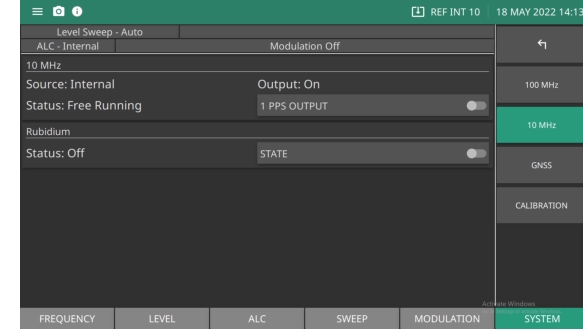
The 10 MHz menu is shown in Figure: 10 MHz Menu. Option 3 and Option 66, allows GNSS to calibrate the 10MHz frequency reference. The menu display depends on the options ordered and external reference inputs. On-site frequency calibration is accomplished by connecting the Rubidium MG362x1A signal generator's GNSS/GPS receiver to an outdoor antenna and locking to he satellite signal. The GNSS/GPS receiver provides a very stable and accurate 1PPS clock for recalibrating the internal time base.
Press SYSTEM | 10 MHz
10 MHz Menu
Source
Displays the 100 MHz reference source. Internal, Internal 10 MHz set as the source
Output
Displays the 10 MHz 1PPS reference source and status. The 10 MHz 1PPS output to the rear panel BNC is active when the 1 PPS Output button is switched on.
STATUS
Displays the lock status of the 100 MHz source.
Rubidium
Displays the internal Rubidium status as Acquiring, Locked, or Off.
State
Set Rubidium state to on or off
Calibration
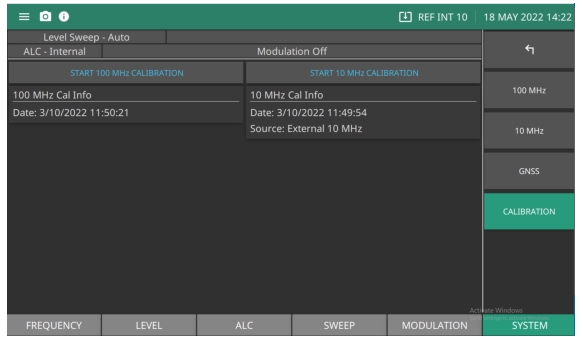
The Calibration menu displays the standard 100 MHz calibration details plus 10 MHz cal info if Option 3 is installed.
Before beginning calibration, allow the MG362x1A to warm-up for a minimum of 120 hours.
CALIBRATION Menu
START CALIBRATION
Initiates the reference source calibration.
100 MHz and 10 MHz CALIBRATION DATE
Provides the last date a reference source calibration was successfully performed.
100 MHz Calibration (Standard Reference)
To calibrate the 100 MHz internal reference:
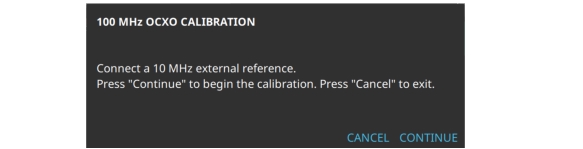
1. To calibrate the 100 MHz internal reference, connect an external 10 MHz reference signal to the MG362x1A rear panel 10 MHz REF IN connector or a 1 PPS.
3. Press CONTINUE to start the calibration. The status bar will display Reference Calibration in Progress. When complete, the CALIBRATION DATE will update.
100 MHz Calibration Dialog
10 MHz Calibration (Option 3)
To calibrate the 10 MHz internal reference:
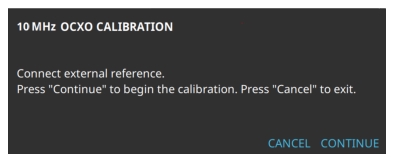
1. Connect an external 10 MHz reference signal to the MG362x1A rear panel 10 MHz REF IN connector, or connect a 1PPS signal to the rear panel PPS BNC connector.
3. Press CONTINUE to start the calibration. The status bar will display Reference Calibration in Progress. When complete, the CALIBRATION DATE will update.
10 MHz Calibration Dialog
RUBIDIUM Menu (Option 56)
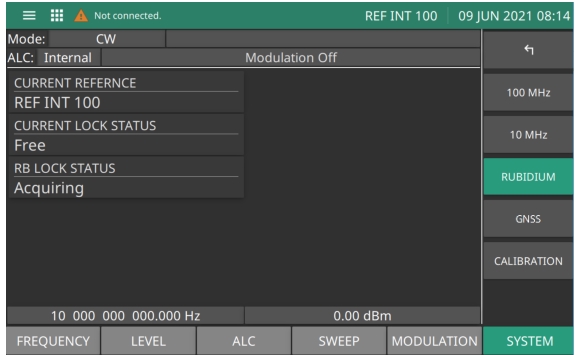
The RUBIDIUM menu is shown in Figure: Rubidium Menu. The menu display depends on the options ordered and external reference inputs. The menu below includes Option 3 with Option 56.
Rubidium Menu
Current Reference
Displays the current active reference oscillator.
Current Lock Status
Displays the lock status of the reference oscillator as Free, Locked, or Not Locked.
RB Lock Status
Displays the lock status of the Rubidium as Acquiring, Locked, or Not Locked.
GNSS Menu (Option 66)
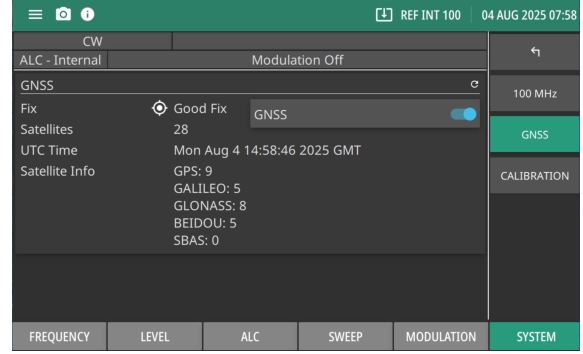
The GNSS menu is shown in Figure: GNSS Menu. On-site frequency calibration is accomplished by connecting the MG362x1A to a GNSS antenna via GNSS port to lock the satellite signal. The GNSS antenna provides a very stable and accurate 1PPS clock for recalibrating the internal time base.
GNSS Menu
GNSS
Turns on/off GNSS toggle. The GNSS fix status displays “Good Fix” or “No Fix”, total number of satellites, UTC time and types of positioned Satellites as satellite info.
Reference Status Conditions
This section describes the reference source types and lock condition indicators. The status conditions depend on the options installed.
Reference Oscillator Current Source
The title bar displays the source that is determining the RF output accuracy as described below:
Internal 10 MHz free running, Low Phase Noise and Ultra High Stability (Option 3) only.
REF INT 100
Internal 100 MHz free running.
Note: For EXT 1PPS, EXT 10, or INT RB, the value may contain “Acquiring” instead of “REF” while the system is in the process of acquiring lock to this reference.
Reference Oscillator Lock Status
The reference oscillator lock condition is described below.
10 MHz Locked:
Indicates the internal 10 MHz is locked to either an internal or external reference.
100 MHz Locked
100 MHz can only be locked to the 10 MHz (Option 3).
Acquiring
Attempting to acquire lock to the reference source indicated by Low Phase Noise and Ultra High Stability (Option 3); or, attempting to acquire lock to an external 10 MHz reference when Low Phase Noise and Ultra High Stability (Option 3 is not installed).
Locked External
100 MHz reference is locked to an external 10 MHz reference and Low Phase Noise and Ultra High Stability (Option 3 is not installed); or, 10 MHz reference is locked to an external reference, either 10 MHz or 1PPS with Low Phase Noise and Ultra High Stability (Option 3).
Locked Rubidium
10 MHz reference is locked to an internal Rb reference Ultra Stable Rubidium Reference (Option 56).
Free Running
100 MHz reference is free running Low Phase Noise and Ultra High Stability (Option 3 is not installed); or, 10 MHz reference is free running Low Phase Noise and Ultra High Stability (Option 3).
Error External
100 MHz reference can't lock to a connected external 10 MHz input Low Phase Noise and Ultra High Stability (Option 3 not installed): or, 10 MHz reference can't lock to a connected external reference, either 10 MHz or 1PPS (Low Phase Noise and Ultra High Stability (Option 3).
Error Rubidium
10 MHz reference can't lock to the internal Rb reference Ultra Stable Rubidium Reference (Option 56) installed.
Error GPS
10 MHz reference can't lock to the internal GPS reference 1PPS. GNSS/GPS Atomic Clock Receiver (Option 6).
Reference Oscillator 100 MHz Lock Status
The 100 MHz reference lock status is described below:
Acquiring
Attempting to lock the 100 MHz to an external 10 MHz reference. Low Phase Noise and Ultra High Stability (Option 3); or, attempting to lock the 100 MHz to the internal 10 MHz reference. Low Phase Noise and Ultra High Stability (Option 3)
Locked
100 MHz is locked to the external 10 MHz. Low Phase Noise and Ultra High Stability (Option 3 is not installed); or, 100 MHz is locked to the internal 10 MHz reference. Low Phase Noise and Ultra High Stability (Option 3).
Free
100 MHz is free running
Error
100 MHz is unable to lock to a connected 10 MHz. Low Phase Noise and Ultra High Stability (Option 3 is not installed); or, 100 MHz is unable to lock to the internal 10 MHz reference, Low Phase Noise and Ultra High Stability (Option 3).
Reference Oscillator GPS Lock Status
Requires GNSS/GPS Atomic Clock Receiver (Option 66). The GPS reference 1PPS lock status is described below:
Locked
The GNSS reference is locked
Acquiring
The GPS reference is acquiring lock
Off
The GPS module in turned off
Error
The GPS reference is unable to acquire lock
Reference Oscillator Rubidium Lock Status
Requires Low Phase Noise and Ultra High Stability (Option 3) and Ultra Stable Rubidium Reference (Option 56). The Rubidium reference lock status is described below:
Locked
The RB internal TCXO is locked to the vapor chamber.
Acquiring
The RB internal TCXO is acquiring lock to the vapor chamber.
Error
The RB internal TCXO is unable to acquire lock to the vapor chamber.