 |
|
Text | TERM | DEFINITION | |
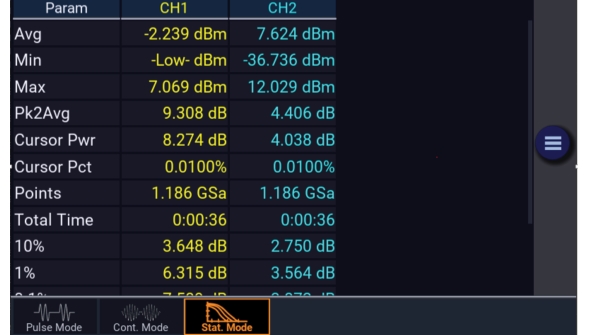
Avg | Average Power | The unweighted average of all linear power samples occurring since acquisition started. | |
Peak | Peak Power | The highest power sample occurring since acquisition was started. | |
Min | Minimum Power | The lowest power sample occurring since acquisition was started. In logarithmic units a reading below the clip level will display as down arrows. | |
Pk2Avg | Ratio | The ratio (in dB) of the Peak Power to the Average Power. | |
Text | TERM | DEFINITION | |
Cursor Pwr | Cursor Power | Cursor Mode - Power Ref | |
Reference | The reference power level in dBr set by the user to define the measurement point on the normalized CCDF for probability in percent. | ||
Cursor Mode - Percent The measured power level in dBr of the normalized CCDF at the Probability in percent specified by the user. | |||
Cursor Pct | Cursor Percentage | Cursor Mode - Power Ref The measured probability in percent of the normalized CCDF at the reference power level specified by the user. | |
Text | TERM | DEFINITION | |
Total | Time | The total time in Hours:Minutes:Seconds that the data acquisition has been running. | |
Points | The total number of data samples in MSa that has been acquired for each channel in the current run. | ||
Note | The total number of data samples is affected by the terminal settings. If Terminal Action is set to decimate, then the sample count will be halved each time the Terminal Count or Time is reached. This should have very little visible effect on the CCDF values, since the entire population is decimated uniformly. If Terminal Action is set to restart, then the sample count will be cleared to zero each time the Terminal Count or Time is reached. |