VectorStar™ MS4640A Series Microwave Vector Network Analyzers : Calibration Menus - 4-Port VNAs : AutoCal 1-Port Cal Setup - 4-Port VNAs
 
AutoCal 1-Port Cal Setup - 4-Port VNAs
AUTOCAL SETUP Menu - 1-Port Cal - 4-Port VNAs
Prerequisites
• 4-Port Mode
Previous
• AUTOCAL PORT Menu - 4-Port VNAs
Navigation
• MAIN | Calibration | CALIBRATION | Calibrate | CALIBRATE | AutoCal | AUTOCAL PORT | 1-Port Cal | AUTOCAL SETUP
 
AUTOCAL PROCEDURE Menu - 1-Port Calibration - 4-Port VNA 
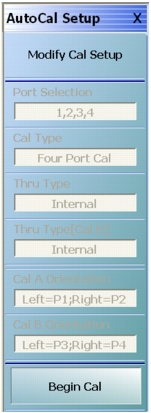
Modify Cal Setup
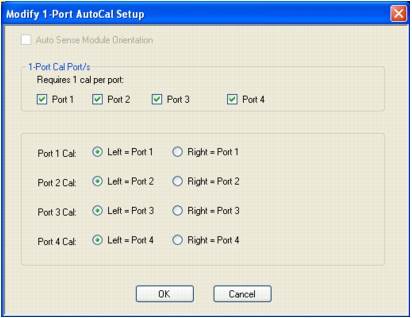
Select displays the MODIFY 1-PORT AUTOCAL SETUP dialog box. The dialog box provides control settings for 1-Port Calibration Ports and Port Left/Right Identification.
Port Selection (Read Only)
Displays the Port or Ports selected for the AutoCal procedure. The settings are determined in the MODIFY 1-PORT AUTOCAL SETUP dialog box.
Cal Type (Read Only)
Displays the Cal Type selected for the AutoCal procedure. The setting is defined in the AUTOCAL PORT menu.
Port 1 Orientation (Read Only)
This read-only button only appears if Port 1 was selected in the MODIFY 1-PORT AUTOCAL SETUP dialog box. If available, shows the left/right assignment for Port 1.
Port 2 Orientation (Read Only)
This read-only button only appears if Port 2 was selected in the MODIFY 1-PORT AUTOCAL SETUP dialog box. If available, shows the left/right assignment for Port 2.
Begin Cal (AutoCal 1-Port Cal)
Starts the AutoCal procedure. On-screen dialogs and prompts provide user instructions for the selected calibration procedure. When the calibration is complete, the display returns to the CALIBRATION [TR] menu where the Cal Status button is now enabled and set to ON.
MODIFY 1-PORT AUTOCAL SETUP Dialog Box - 4-Port VNAs
Previous
• AUTOCAL SETUP Menu - 1-Port Cal - 4-Port VNAs
Navigation
• MAIN | Calibration | CALIBRATION | Calibrate | CALIBRATE | AutoCal | AUTOCAL PORT | 4-Port Cal | AUTOCAL SETUP | Modify Cal Setup | MODIFY 1-PORT AUTOCAL SETUP Dialog Box
 
MODIFY 1-PORT AUTOCAL SETUP Dialog Box - 4-Port VNAs
Auto Sense Module Orientation
The Auto Sense Module Orientation is not available for 2-Port AutoCal calibrations.
1-Port Cal Port(2)
Select any combination of ports from Port 1, Port 2, Port 3, or Port 4.
For each port selected above, a left/right configuration radio button becomes available below.
Port Sense Left/Right Configuration
For each selected port above, select the left/right assignment:
• Port 1 Cal: Left = Port 1 or Right = Port 1
• Port 2 Cal: Left = Port 2 or Right = Port 2
• Port 3 Cal: Left = Port 3 or Right = Port 3
• Port 4 Cal: Left = Port 4 or Right = Port 4
Completing AutoCal Setup
When all AutoCal Setup functions are completed, click OK to return to the AutoCal menu. Click Cancel to make no changes and close the dialog box.
• AUTOCAL SETUP Menu - 1-Port Cal - 4-Port VNAs