This chapter provides a brief overview of the Anritsu MS272xB Spectrum Master and the MS8911B Digital Broadcast Field Analyzer. The intent of this chapter is to provide a starting point for making basic measurement setups. This chapter describes setup, configure frequency, bandwidth, and amplitude before configuring your measurement setups. After measurements are taken, refer to section “Managing Files” on page 1‑1 for a description of saving, recalling, and deleting measurement files. For more detailed information about specific measurements, refer to the measurement descriptions in the measurement guides for the specific instrument mode and analyzer technology (such as Spectrum Analyzer, WiMAX, or 3GPP). The Digital Television Analyzer Measurement Guide includes sections that describe DVB‑T/H and ISDB‑T measurements. Refer to Measurement Guides, for a list of these measurement guides and their Anritsu part numbers.
The Spectrum Analyzer Measurement Guide includes sections that describe resolution bandwidth, video bandwidth, sweep, and attenuator functions. For example, in the Spectrum Master, Resolution Bandwidth is determined by the intermediate frequency (IF) filter bandwidth. The spectrum analyzer traces the shape of the IF filter as it tunes past a signal. If more than one IF filter is used in a spectrum analyzer, then the narrowest one dominates and is considered the resolution bandwidth.
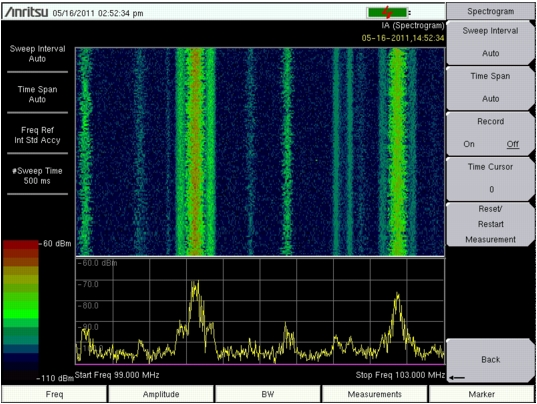
Interference Analysis offers spectrogram measurements. Figure: Spectrogram Example is an example of a spectrogram display. This image may differ from any spectrogram on your instrument.
 |