 | Frequency: Displays the signal’s center frequency. |
 | Sample Rate Displays the signal sample rate. The number of I/Q values per second stored in the selected file. IQ sampling rate and capture bandwidth are interactive. |
 | Sample Count The total samples captured. |
 | Bandwidth Bandwidth of the captured signal around the center frequency. IQ sampling rate and capture bandwidth are interactive. |
 | Capture Length The duration of the waveform data capture. |
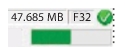 | Miscellaneous Data 47.685: The size of the file. F32: The bit size. Green Checked Indicator: The signal is signed and the file is compatible with Option 128 units. See Signed/Unsigned Indicator. Status Indicator: Displays the loading status of the selected file. |
