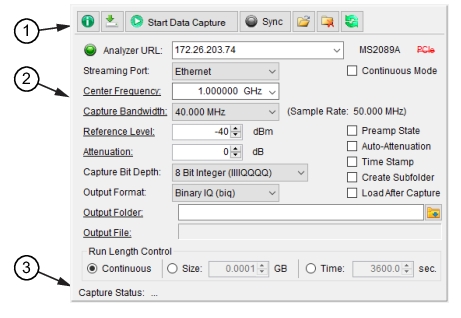
IQ Signal Master™ MX280005A Vector Signal Analysis Software : File Mode : Capture Menu : IQ Acquisition Parameters Settings
 
IQ Acquisition Parameters Settings
The IQ acquisition parameters settings window is the primary setup panel for designating the capture parameters. The user must specify the analyzer setup parameters, the capture bandwidth, data format, preamp and attenuation states, and designate a location for data to be stored on the local hard disk.
Note 
If streaming to local memory (Internal or USB), use the “Combine Files” switch located on the Anritsu MS2090A Spectrum Analyzer MEASURE menu. The Combine Files switch must be set to “on” as shown below to obtain a complete file set containing the entire IQ capture data set.

For more information on capturing data directly to the spectrum analyzer, refer to your Anritsu spectrum analyzer user guide.
IQ Acquisition Parameter Settings Window