 | |
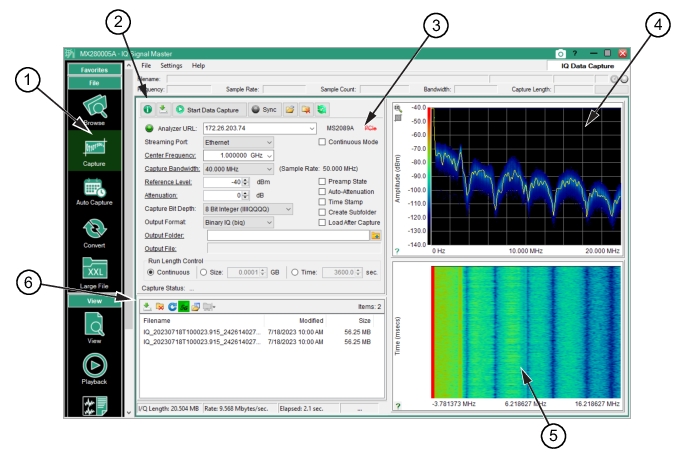
1. Capture Menu: Press to display the Capture Menu. 3. IQ Acquisition Parameters Settings Window: Use the Capture parameters window to set the IQ data streaming from supported Anritsu analyzers. It currently supports the MS2089A, MS2080A, MS2090A, MS27200A, MS27201A, and MS2710xA series analyzers and can stream IQ data from the Ethernet port or the MA25101A PCIe card. See IQ Acquisition Parameters Settings. 4. Live IQ Data Window: Live trace display window with peak-detect sensitivity control. 5. Spectrogram Window: Displays a spectrogram view of the signal. 6. Remote File List Toolbar and Window: Displays captured files form a remote spectrum analyzer. See Remote File List. |