 |
Note | MX2710xA does not support remote files. |
Note | On the spectrum analyzer’s user interface, there is a command selection under the IQ Measurement menu labeled "SAVE TO FILE". This can be "Automatic" or "Manual". If it is “Automatic”, then every time MX280005A performs a capture, the data is also stored redundantly on the spectrum analyzer. This will fill up the internal storage. It may be best to set to Manual while doing the capture with the MX280005A software. But set the analyzer to "Automatic" if doing captures from the front panel. |
|
 |
 |
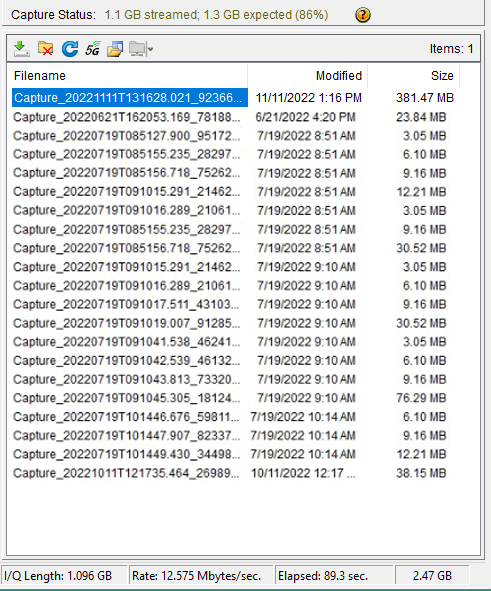
-  | Access Files: Download all remote IQ files. |
 | Delete Files Delete all IQ data files on the remote spectrum analyzer. |
 | Refresh Refresh the remote file list. |
 | 5G Filter Press to filter and display either the .bin files or the .dgzm files in the window. |
 | Open File Automatically load files when transferred from spectrum analyzer. |
 | MS2720T File Folder Active only when connected to an MS2720T. Drop-down shows the list of MS2720T sub-folders that can be opened. |
 | Items Shows the total number of files listed in the remote file list. |
 |
IQ Length Total bytes downloaded in the most recent capture. Rate Data transfer rate for the most recent transfer. Elapsed Elapsed time for the data transfer. Shows only the transfer time after the capture is complete on the spectrum analyzer. This does not include the capture time for block mode captures. Disk Space Available The available disk space for the IQ data transfer. If the active disk drive is the user’s ‘C:’ drive, this will be 2.0 GB less than the actual free disk space. This is to provide margin so the boot-disk is not entirely filled. For other drives the margin is 20 MB. If you are using your ‘C:’ drive for data collection, and the drive has 10.0 GB of free space, this will show 8.0 GB, which is the space available for IQ capture. |