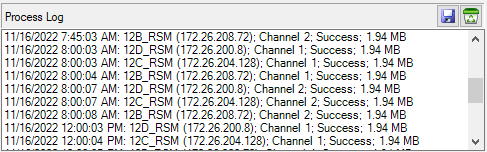
The Auto Capture process log updates the remote spectrum monitor capture status when the
Capture Now: is pressed or
Auto Capture button is active as shown in
Figure: Process Log. Each line shows the date and time of the ping to each monitor, the name of the remote monitor, model, IP address, channel, if the communication was successful (if unsuccessful, the status line will be in red font), and the size of the each file capture.
Press the Save icon to save the process log to a user selected file location or the Clear icon to clear the entire process log.