.png) | Anritsu DGZ (IQ Capture) Set if importing from an Anritsu DGZ file. Anritsu WVD Set if importing from an Anritsu WVD file (Vector Signal Generator format). Anritsu WCAP (IQ Capture) Set if importing from an Anritsu WCAP file. Anritsu.vsg Set if importing from an Anritsu.vsg file. Binary Set if importing from a single raw data file that has IQ values. Set the bit format as 8 bit, 16 bit, 24 bit, 32 bit Float, 32 bit Integer, or 5G Capture. Set the Endianness as (LE) Little Endian or (BE) Big Endian. Text Set the Text delimiter that appears between the I and Q values as Auto, Comma, Tab, or Semicolon. Auto automatically checks the delimiter. SpectroX XDat File Set if importing a SpectroX xdat file. The .xdat file format is the file format required for analyses using the X-Com SpectroX software; .xdat files are for use in the SpectroX software. Wave File Set if importing a Wave file. Supported Wave files are not audio files. Some I/Q capture applications appropriate the Wave file format, using the two stereo channels to hold I and Q value pairs and storing the capture parameters in the Wave file header. |
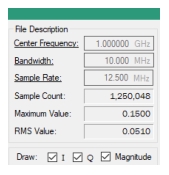 | Center Frequency Center frequency value of the imported IQ file. The underline indicates this value can be edited. Press Center Frequency to change the center frequency value. Bandwidth Bandwidth value of the imported IQ file. The underline indicates this value can be edited. Press Bandwidth to change the bandwidth value. Sample Rate Sample rate value of the imported IQ file. The underline indicates this value can be edited. Press Sample Rate to change the center frequency value. Sample Count sample count of the imported IQ file. This value cannot be changed. If the resulting sample count is over 1 Gs, then a warning message appears and the sample size is truncated to 1 Gs. Maximum Value Maximum value of the imported IQ file. This value cannot be changed. RMS Value RMS value of the imported IQ file. This value cannot be changed. Draw Set the Magnitude, IQ data screens to view by checking I, Q, or Magnitude. |