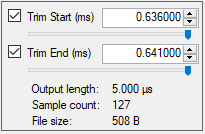
Adjust the trim start and stop times of the signal using the Trim Window shown in Figure: Trim Adjust Window.
Trim Adjust Window
Trim Start (ms)
Check to start the signal at the time set. The range is 0.000000 ms to 1.000000 ms.
Trim Stop (ms)
Check to stop the signal at the time set. The range is 0.000000 ms to 1.000000 ms.
Slider
Manually move the slider to set the start trim and stop trim values. The resulting Output length, Sample count, and File size values are shown below the trim entry fields.