IQ Signal Masterâ„¢ MX280005A Vector Signal Analysis Software : Analysis Mode : 5G Frame Analysis Menu : Locate SSB Example
 
Locate SSB Example
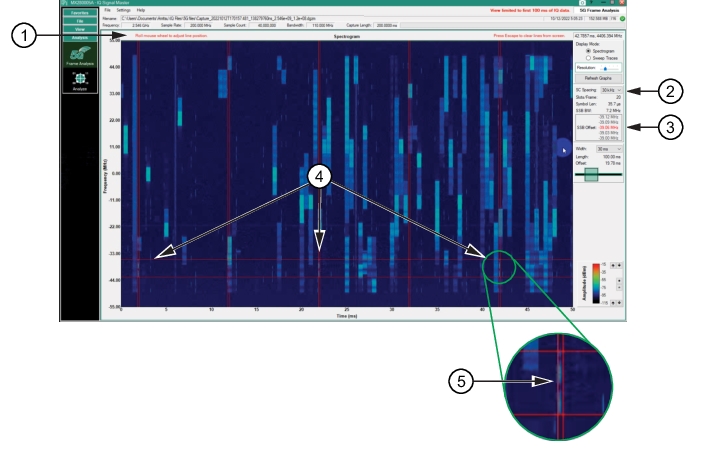
Locate the SSB to perform the 5G frame analysis as shown in Figure: SSB Analysis
SSB Analysis
1. Grid Mouse Instruction
2. Sub Carrier Spacing
3. SSB Offset
4. Locate SSB signal
5. Width and height of SSB with SSB located in center.
Locate the SSB Example
Refer to Figure: SSB Analysis.
1. Set the Display Mode to Spectrogram.
2. Set the SC Spacing (this example is set to 30 kHz).
3. Click the spectrogram graph to display the SSB grid. The double grid lines display the width and height of the SSB.
4. Scan the spectrogram until the SSBs are identified as they align in the time intervals (20 ms) as shown. Once the SSB has been located, roll the mouse to optimize the SSB alignment between the SC spacing grid lines. This is the SSB as indicated in the red font of the SSB offset window.