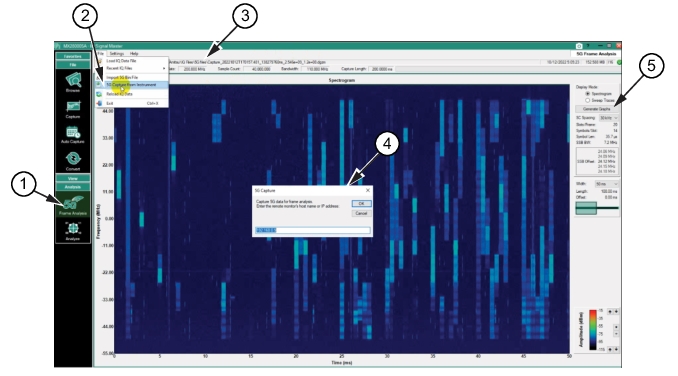
Importing 5G IQ data from an Anritsu Analyzer, such as the MS2090A, can be performed in a few steps. Use the MX280005A IQ Signal Master 5G Frame Analysis File menu to import the 5G capture file from an MS2090A Spectrum Analyzer.
2. Click the File menu to display the pull-down menu.
3. Click the 5G “Capture from Instrument” command. The 5G Capture dialog is displayed.
4. Type the IP address of the 5G Capture dialog. This command initially simulates pressing the 5G CAPTURE button on the MS2090A. It will take a few seconds to capture the data and load the file into to the MX280005A IQ Signal Master program. The .bin file imported from the MS2090A converts it to a .dgzm file in the MX280005A program automatically.
5. From the 5G Frame Analysis menu, press the Generate Graphs button to display the 5G data in the Spectrogram display.