 |
|
- 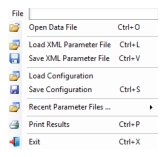 | Open Data File Open to display the recent data files that have been viewed. Load XML Parameter File Browse the XML parameter files to load. XML Parameter files contain all of the parameter settings used in the analysis. These files are user created and are a snapshot of previous settings. Save XML Parameter File: Save an .xml file to a user specified file location. Saved XML Parameter files contain all of the parameter settings used in the analysis. Load Configuration Load from a user specified file location. Configuration files have the same information as XML parameter files and also include application settings such as the data file, active output view modes, screen capture and printing settings, etc. Save Configuration Save to a user specified file location. Saved Configuration files include the analysis parameters and also application settings such as the data file, the active output views, screen capture and printing settings, etc. Recent Parameter Files For convenience, provides a list of recently saved parameter and configuration files. Click a file to open. Print Results Opens the Print dialog. See Print Results. Exit Close to exit the program. |