The signal generator can generate broad (full range) and narrow band sweeps across the frequency range of the instrument. The MG362x1A sweep modes includes analog sweep, step sweep, and list sweep. The SWEEP menu consists of following submenus:
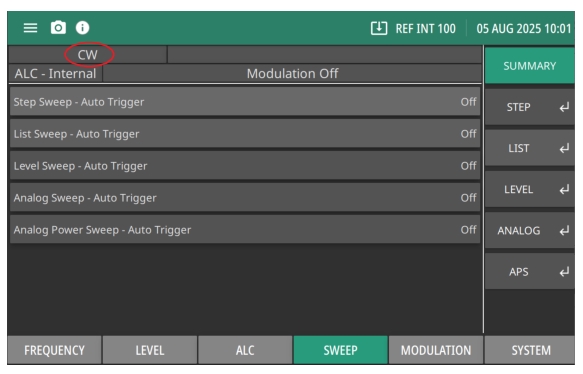
The SWEEP Menu provides the MG362x1A Sweep On or Off status for Step Sweep, List Sweep, Level Sweep (Option 6) and Analog Power Sweep (Option 16). Note the status bar displays CW when the Sweep submenus are set to off by default as shown in Figure: SWEEP Menu - Summary. But when the sweep toggle of the corresponding submenu is turned on, the status bar will display the sweep that is selected.
In step sweep frequency mode, the output frequency changes in discrete, synthesized steps between the selected start and stop frequencies. Step sweeps can start from a low frequency to a high frequency or from a high frequency to a low frequency. The sweep width can be set from 0.001 Hz to the full frequency range of the instrument. The step size or number of points between the sweep start and stop frequencies, the step dwell time, and sweep trigger are controllable from the SWEEP main menus.
In linear step sweep, the sweep is linearly incremented (or decremented) by the step size from the start frequency to the stop frequency. Two ways to set the size of each step of the linear step sweep:
1. Set the step size: The step size frequency range is 9 kHz to the full frequency range of the instrument.
2. Set the number of points: The number of points range is 2 to 65535.
If the step size does not divide into the frequency range, the last step is truncated.
In logarithmic step sweep, step size increases logarithmically with the frequency and is determined by a logarithmic curve between the sweep start and stop frequencies and the number of points. The number of points ranges from 2 to 65535.
SETUP Menu
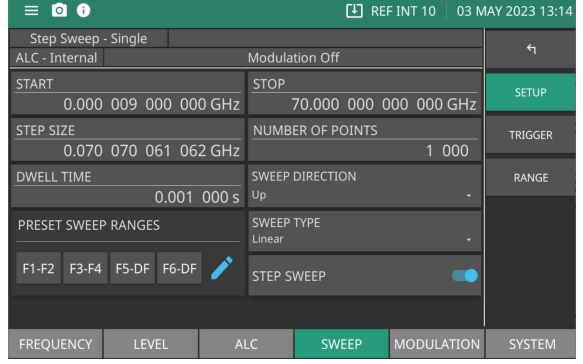
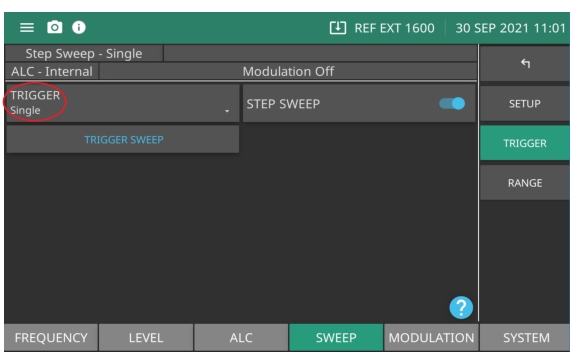
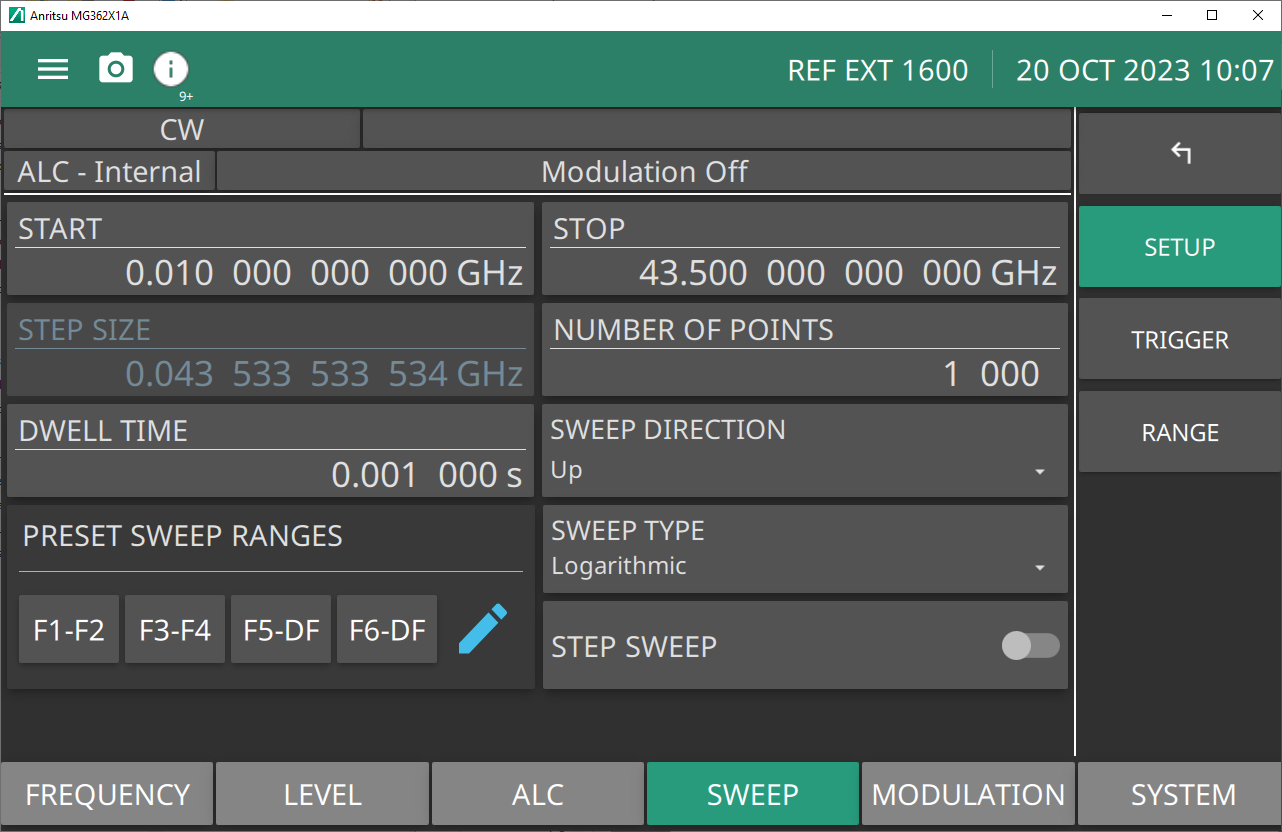
Pressing STEP from the SWEEP menu displays the SETUP menu. When the STEP SWEEP button is toggled on, the status bar displays Step Sweep - Single. Note that the sweep displayed at the status bar is dependent on the sweep selected in the TRIGGER menu. The sweep displayed at the status bar is dependent on the sweep selected from the SUMAMARY menu or from the TRIGGER menu. See TRIGGER Menu.
Press: SWEEP | STEP
STEP - SETUP Menu
START
Set the start frequency of the step sweep.
STOP
Set the stop frequency of the step sweep.
STEP SIZE
Set the step size of the step sweep.
NUMBER OF POINTS
Set the number of points in a step sweep. Range is 2 to 65535.
DWELL TIME
Sets the sweep per point dwell time. Units are in seconds. Range is 1e-05 seconds to 99 seconds.
SWEEP DIRECTION
Sets the direction of the sweep up/down. Up = sweeps from start to stop sweep. Down = sweeps from stop to start sweep.
PRESET SWEEP RANGES
Selects a frequency sweep range preset.
Range: F1F2 | F3F4 | F5DF | F6DF
SWEEP TYPE
Sets the parameter for sweep type to Logarithmic or Linear sweep operation.
STEP SWEEP
Toggle step sweep on or off.
Editing the Current Start/Stop Frequencies
To edit the current frequency sweep range, open either the start or stop frequency parameter field. In the display shown in Figure: STEP - SETUP Menu, pressSTARTopens the start frequency parameter. Press STOP opens the stop frequency parameter. Edit the open frequency parameters. When complete, close the open parameter using a termination key. These are set as the start and stop frequencies for the sweep.
Setting the Step Size
Press STEP SIZE to open the step size parameter.
Open the parameter you wish to change, then edit the current value using the cursor control keys, the rotary data knob, or enter a new value using the key pad and appropriate termination soft key. When you have finished setting the open parameter, close it by pressing its menu soft key or make another menu selection.
In STEP SWEEP, the sweep is linearly incremented (or decremented) by the step size beginning with the start frequency to the stop frequency. There are two ways to set the size of each step of the linear step sweep.
Set the step size or set the number of points. The step size range is 9 kHz to the full frequency range of the instrument. When the step DWELL TIME, STEP SIZE, or NUMBER OF POINTS is set, the sweep time equals:
Step Dwell time × Number of Points + total phase-locking time for all the step frequencies.
Press the STEP SIZE button to open the step size parameter. Edit the open frequency parameter. When complete, close the open parameter using a termination key.
Note
The Step Size and Number of Points parameters are coupled values and change when either value is changed. When a coupled parameter value changes, its text color changes to blue.
Number of Points
Sets the number of points in a stepped frequency sweep or stepped power sweep. Points and step are coupled values. Entering the value for one will cause the other to be recalculated per the following formula:
points = (span / step) + 1
Entering a new value or either parameter will not change the span. An error will be generated if the points entered results in a calculated step size less than the minimum resolution for a stepped frequency sweep or a stepped power level sweep. An error will also be generated if the entered step size results in the number of points exceeding its maximum.
Setting the NUMBER OF POINTS (Number of Steps)
The number of points range is 2 to 65535. If the step size does not divide into the frequency range, the last step is truncated. When the step Dwell Time, Step Size, or Number of points is set:
sweep time = Step Dwell time × Number of Points + total phase-locking time for all step frequencies.
Press the NUMBER OF POINTS button to open the step size parameter. Edit the open frequency parameter and close the open parameter using a termination key.
Note
The Step Size or the Number of Points parameters are coupled values and may change dynamically to accommodate the setup. When a parameter changes, its text color changes to blue.
Setting DWELL TIME
The dwell-time-per-step of the step sweep can be set for any time in the range of 10 µs to 99 s. When dwell-time-per-step, step size or number of points is set, the sweep time equals dwell-time-per-step times the number of points plus the total phase-locking time for all the step frequencies. If sweep time is set, then dwell-time-per-step is the result of the sweep time divided by the number of points.
The dwell time of the step sweep can be set for any time in the range of 10 µs to 99 s. When the step Dwell Time, Step Size, or Number of Points is set:
Sweep time = Step Dwell time × Number of Points + total phase-locking time for all step frequencies.
Press the DWELL TIME button to open the dwell time parameter. Edit the open frequency parameter. When you complete, close the open parameter using a termination key.
• Press F1-F2: Provides a frequency sweep between the start frequency, F1, and the stop frequency, F2.
• Press F3-F4: Provides a frequency sweep between the start frequency, F3, and the stop frequency, F4.
• Press F5-DF:Provides a symmetrical frequency sweep about the center frequency, F5. The sweep width is determined by the dF frequency parameter.
• Press F6-DF: Provides a symmetrical frequency sweep about the center frequency, F6. The sweep width is determined by the dF frequency parameter. The Delta Frequency can be applied to any F0 - F9 frequency.
Press a preset sweep range parameters as F1-F2, F3-F4, F5-F6, and DF (Delta Frequency).
Setting SWEEP DIRECTION
Sets the direction of the sweep as forward or reverse.
Up: Forward Sweep. Initiates the frequency sweep from the start frequency to stop frequency direction.
Down: Reverse Sweep. Initiates the frequency sweep from the stop frequency to start frequency direction.
Setting SWEEP TYPE
Set the type of stepped frequency sweep as Linear or Logarithmic:
Linear: The frequency sweep is linearly incremented by the step size from the start frequency to the stop frequency. The size of each step is set using the STEP SIZE or NUMBER OF POINTS.
Logarithmic: Step size increases logarithmically with frequency and is determined by a logarithmic curve fitted between the sweep start/stop frequencies. The number of steps is set using the NUMBER OF POINTS.
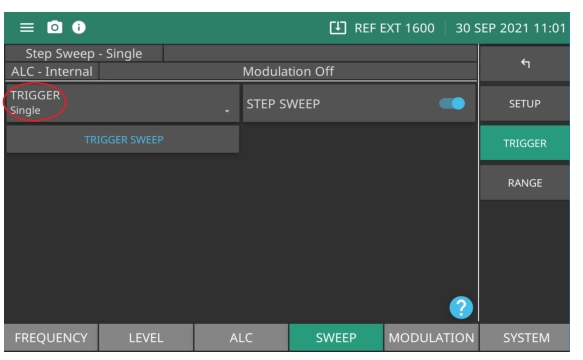
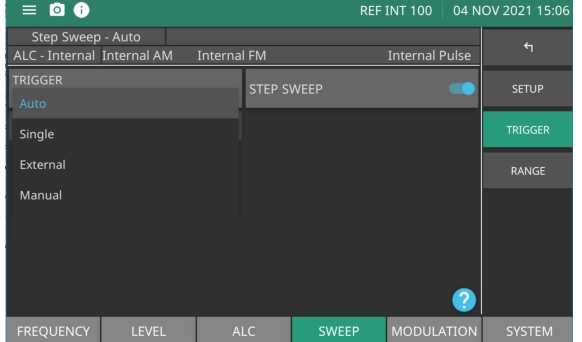
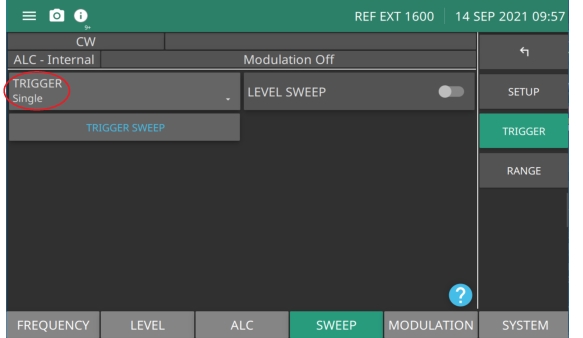
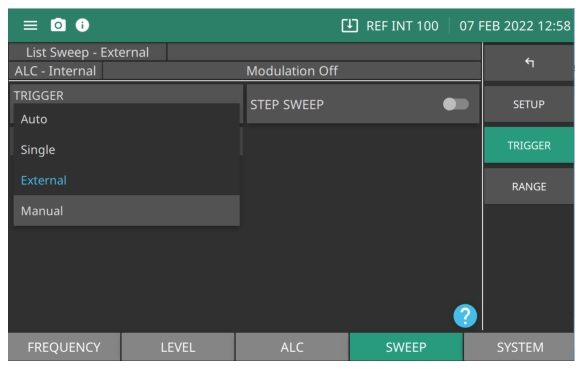
Press to display the trigger types: Auto, Single, External, Manual, and Remote shown in Figure: SWEEP TRIGGER Menu.
Step Sweep
Toggle step sweep on or off.
Trigger Sweep
Trigger a single sweep. Enabled only in single sweep trigger mode. When TRIGGER is set to Manual Sweep, the TRIGGER POINT button is enabled. See List Mode Sweep Trigger Types.
RANGE Menu
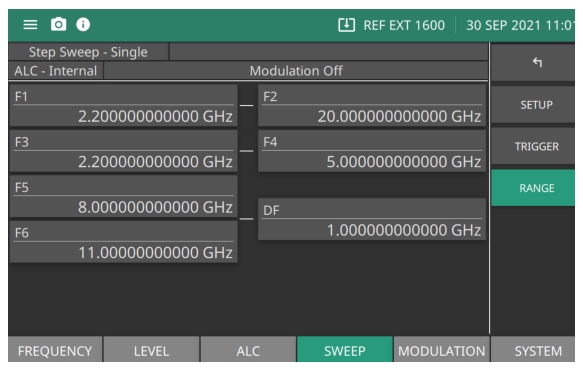
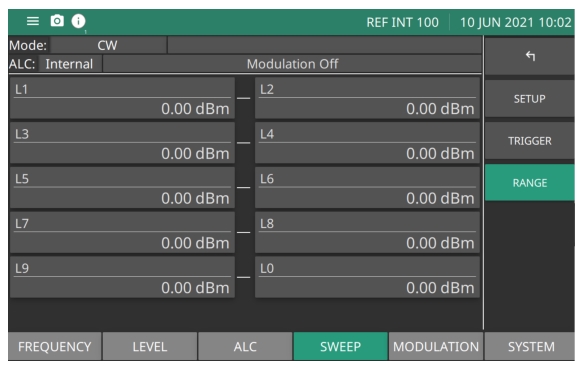
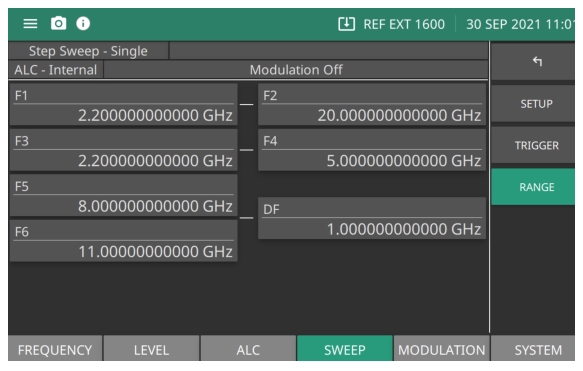
The STEP RANGE menu provides frequency parameter range settings. The RANGE menu is shown in Figure: RANGE Menu.
Press: SWEEP | STEP | RANGE
RANGE Menu
F1-F2
Frequency preset parameters. Sets as a pair when setting a sweep.
F3-F4
Frequency preset parameters. Sets as a pair when setting a sweep.
F5 dF
Frequency preset parameters. This sweep preset includes dF and delta Frequency preset.
F6-dF
Frequency preset parameters. This sweep preset includes dF and delta Frequency preset.
Starting a Step Sweep
Step sweep is initiated when the trigger sweep button is pressed as described below.
Press to display the trigger types: Auto, Single, External, Manual, and Remote shown in Figure: TRIGGER TYPES.
Step Sweep
Toggle step sweep on or off.
Trigger Sweep
Trigger a single sweep. Enabled only in single sweep trigger mode. When TRIGGER is set to Manual Sweep, the TRIGGER POINT button is enabled. See List Mode Sweep Trigger Types.
Sweep TRIGGER TYPES
Select the sweep type to generate. Press the TRIGGER button to display the sweep types shown in Figure: Press Sweep Trigger.
Press Sweep Trigger
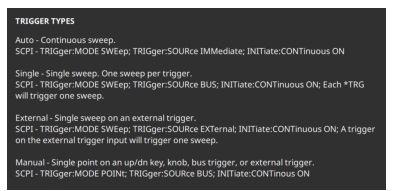
Press the question mark icon to display the TRIGGER TYPES dialog shown in Figure: TRIGGER TYPES. The dialog provides a description of the sweep trigger types.
TRIGGER TYPES
Auto (Automatic): The sweep continually sweeps from the start frequency to the stop frequency with optimal retrace time.
External: The sweep recurs when triggered by an external TTL-compatible clock pulse to the rear panel AUX I/O connector, pin 13. The external sweep initiates when the TRIGGER SWEEP button is pressed.
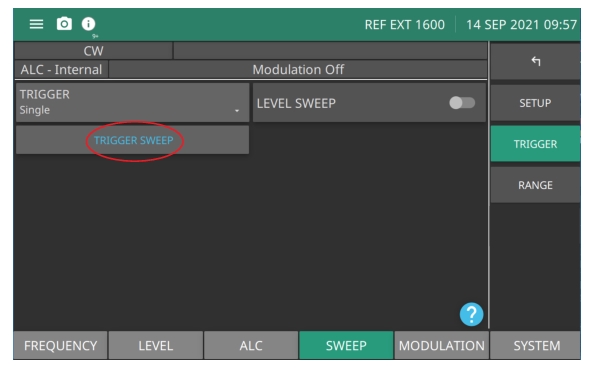
Single: A single sweep starts when the TRIGGER SWEEP button is pressed. If a sweep is in progress when the trigger button is pressed, the current sweep aborts, goes to ramp rest, and waits for another trigger.
Manual: Single point on an up/down button, knob, bus trigger or external trigger.
Initiate Step Sweep
To initiate an Auto or External sweep
1. Press Trigger Type.
2. Press Auto or External sweep.
3. Press the Step Sweep button to activate the sweep.
To initiate a Single sweep
1. Press Trigger Type.
2. Press Single.
3. Press TRIGGER SWEEP to activate the sweep. A single sweep is initiated each time the TRIGGER SWEEP button is pressed.
To initiate a Manual Sweep:
In manual sweep frequency mode, TRIGGER POINT button is displayed. Trigger Point is described in section TRIGGER SWEEP/TRIGGER POINT. The output frequency can be manually tuned in phase-locked steps between the selected start and stop frequencies using the cursor control keys or rotary data knob. As the knob is turned or the cursor control, the current output frequency is incremented by the step size and displayed on the data display. The step size or number of points between the start and stop frequencies are controlled from the STEP SWEEP menu shown in Figure: STEP - SETUP Menu.
LIST
LIST sweep is a step sweep of preset frequency and level pairs. The pairs are defined in separate frequency and power levels. Sweeping in accomplished by defining start and stop indexes. List Mode provides two settings for creating a sweep:
• Points: The number of points (steps) per sweep parameter.
• Sweep: Set the sweep per point dwell time.
SETUP
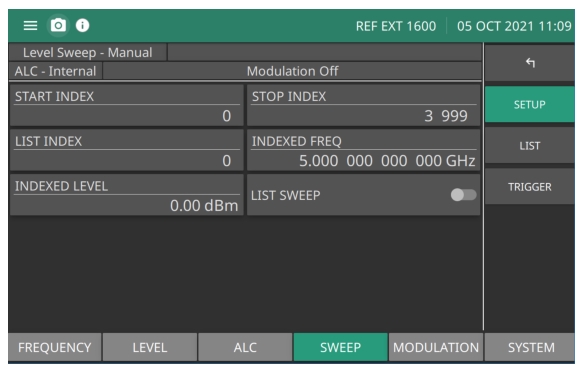
The Sweep list index (0 through 3999) contains frequency/power level settings compiled into a list. Each frequency can have a different power level setting. The list sweep is defined by a list start index and list stop index. The list of up to 4000 frequency/power level sets is stored in non-volatile RAM to preserve any settings after the instrument is powered off. The list is not stored with the other setup information in the instrument.
When automatic, external, or single trigger mode is selected, the output sweeps between the specified list start and stop indexes, dwelling at each list index for the specified dwell time.
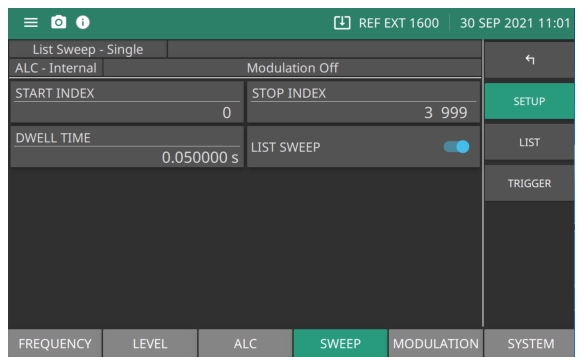
Selecting LIST from the SWEEP menu displays the menu shown in Figure: LIST SETUP Menu. When the LIST SWEEP button is toggled on, the status bars displays List Sweep - Single. Note that the sweep displayed at the status bar is dependent on the sweep selected in the TRIGGER menu. See LIST TRIGGER Menu.
Press: SWEEP| LIST
LIST TRIGGER - Set to Manual Sweep
START INDEX
Select the sweep start index. The Index (0 through 3999) is enabled in all trigger modes. See Editing the START INDEX.
STOP INDEX
Select the sweep stop index.The Index (0 through 3999) is enabled in all trigger modes. See Editing the STOP INDEX.
LIST INDEX
Press to type a single indexed frequency/level pair location (0 to 3999) to view in the Index List. See LIST - LIST Menu.
LIST SWEEP
Toggle to activate or deactivate the list sweep.
LIST SETUP Menu
START INDEX
Select the sweep start index. The Index (0 through 3999) is enabled in all trigger modes.
STOP INDEX
Select the sweep stop index.The Index (0 through 3999) is enabled in all trigger modes.
DWELL TIME
Sets the dwell time at each sweep step. Units is in seconds.
LIST SWEEP
Toggle to activate or deactivate the list sweep.
Editing the START INDEX
Press START INDEX to open the start index parameter field for editing. Edit the start index using the cursor control keys, rotary data knob, or enter a new value using the keypad. Press the Enter button when complete to close the parameter edit window.
Editing the STOP INDEX
Press LIST STOPto open the stop index parameter field for editing. Edit the stop index using the cursor control keys, rotary data knob, or enter a new value using the keypad. Press the ENTER button when complete to close the parameter edit window.
LIST TRIGGER Menu
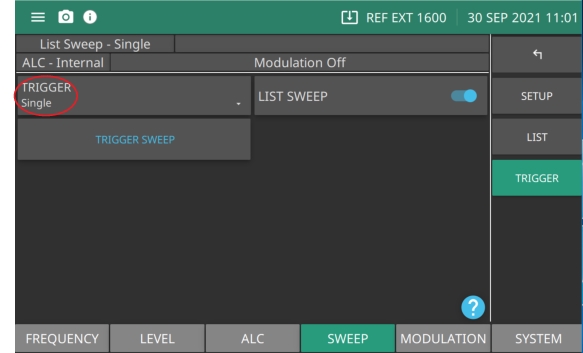
When manual trigger mode is selected, the list start index, list stop index, and dwell time parameter are not used. Instead, the list index is incremented or decremented by using the front panel cursor control keys. In manual trigger mode, the list index can also be incremented by using an external trigger input. Each trigger increments the list index by one.
After a reset, the list sweep defaults to manual trigger mode. The data display shows the trigger mode, list index, current frequency, and current power level. The list index specifies the current location within the list. When automatic, external, or single trigger mode is selected, the data display changes to show the trigger mode and list sweep start and stop index values only. The LIST TRIGGER menu is shown in Figure: SWEEP LEVEL TRIGGER Menu.
Press: SWEEP | LIST | TRIGGER| TRIGGER
SWEEP LEVEL TRIGGER Menu
TRIGGER
Press to display the trigger types: Auto, Single, External, Manual, and Remote. Pressing the information icon at the bottom right of the screen shows the TRIGGER TYPES description dialog shown in Figure: TRIGGER TYPES.
LIST SWEEP
Press to initiate a sweep of the List sweep parameters.
TRIGGER SWEEP
Trigger a single sweep. Enabled only in single sweep trigger mode.
List Mode Sweep Trigger Types
TRIGGER SWEEP: Sets a complete sweep upon receiving a trigger. Available in all sweeps except Manual Sweep.
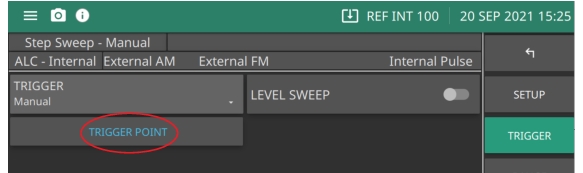
TRIGGER POINT: Active in Manual Trigger only. Each time the TRIGGER POINT button is pressed. the sweep advances to the next CW point in the sweep.
LIST - LIST Menu
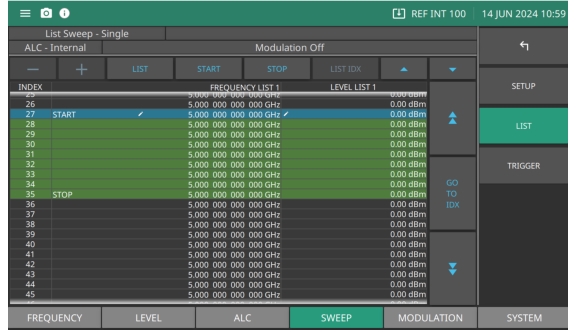
The LIST - LIST MENU provides a list index that identifies each frequency/power level set in the list. The list sweep menu consists of a 4000 (0 to 3999) rows of listed start index and stop index. Scroll through the list and edit the paired frequencies and power levels. Use the cursor control keys to select a frequency or power level from the list.
Select the index number of the frequency and level pair. Enabled only in manual trigger source.
+
Selects the sweep start index. Enabled in all trigger modes.
EDIT FREQ
Selects the sweep stop index. Enabled in all trigger modes.
EDIT LEVEL
Sets the dwell time at each sweep step.
or
Scroll up or down per row.
GO TO IDX
Press double-arrow up to scroll up or double-arrow down to scroll down per page.
Press page up (blue double-up arrow) to scroll the displayed frequencies/levels to the previous page in the list. Press page down (blue double-down arrow) to scroll the displayed frequencies/levels to the next page in the list.
Select the index row (highlighted list index) and press either the EDIT FREQ or EDIT LEVEL button to edit the open parameter. Edit the open parameter using the cursor control keys, rotary data knob, or enter a new value using the keypad and appropriate termination.
The complete list of 4000 (0-3999) index values remain as part of the list. Generally, a list sweep starts with list index 0 and stops at the index number of desired frequency steps, which may be less than index number. Each list index can also be individually edited from the List Setup and List Type menus.
COPY TO LIST
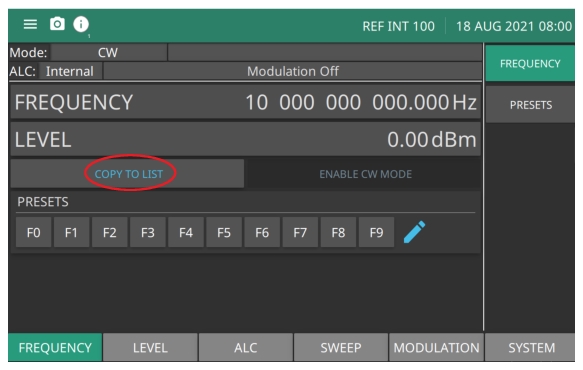
An easy method of entering frequency and power level information into the current list index is to copy the set parameters from the CW menu.
From the main FREQUENCY menu, press the FREQUENCY and LEVEL to edit the parameters. Then press the COPY TO LIST button shown in Figure: COPY TO LIST to open the list index parameter.Once the frequency and power level information has been entered into the current list index, the list index is incremented by one.
COPY TO LIST
Level
The signal generator provides leveled output power sweeps at CW frequencies and in conjunction with frequency sweeps. Power level sweeps can be from a set to sweep from high level to a low level range or from a low to a high level range. Power level sweeps can be selected to be linear or logarithmic. Level sweep menus provide the sweep range, the step size, the dwell time-per-step, and the type of power sweep (linear or logarithmic), sweep direction, and sweep trigger.
Sets the parameter for sweep type to logarithmic or linear sweep operation.
STEP SWEEP
Set to start or stop step sweep.
Setting CW Power Sweep, Step Size, and Dwell Time
To set the size of each step of the CW power sweep, set the step size or set the number of steps. The step size range is 0.01 dB (Log) or 0.001 mV (Linear) to 163 dB; the number of steps range is 1 to 10,000. The dwell time-per-step of the CW power sweep can be set for any time in the range of 1 ms to 99 sec. If the sweep crosses a step attenuator setting, there will be a sweep dwell of approximately 20 ms to allow setting of the step attenuator.
• Press DWELL TIME to open the dwell time-per-step parameter.
• Press STEP SIZE to open the step size parameter.
• Press NUMBER OF POINTS to open the number of steps parameter.
Press and edit the current value using the cursor control keys, rotary data knob, or enter a new value using the key pad and appropriate termination button. When you have finished setting the open parameter, close it by pressing its menu soft key or by making another menu selection.
Triggering a CW Power Sweep
In the CW power sweep mode, use the TRIGGER menu to sweep output power steps between any two power levels.
Press to display the trigger types: Auto, Single, External, Manual, and Remote. Pressing the question mark icon at the bottom right of the screen displays the TRIGGER TYPES description dialog shown in Figure: TRIGGER TYPES.
LEVEL SWEEP
Toggle to set level sweep on or off.
TRIGGER SWEEP
Available in single sweep only. Press to trigger a sweep.
• Manual: Manual sweep is triggered when TRIGGER POINT is pressed. TRIGGER POINT button is available only when TRIGGER is set to Manual. See TRIGGER SWEEP/TRIGGER POINT.
TRIGGER SWEEP/TRIGGER POINT
TRIGGER SWEEP: Available in all sweeps except Manual Sweep. See Figure: TRIGGER SWEEP Button. Pressing TRIGGER SWEEP starts a single sweep. If a single CW power sweep is in progress, pressing TRIGGER SWEEP again aborts the sweep and resets to the beginning sweep point.
TRIGGER POINT: Active in Manual Trigger only and available in step sweep mode. See Figure: TRIGGER POINT Button. Each time the TRIGGER POINT button is pressed, the sweep advances to the next CW point in the sweep. For example a step sweep set at 10 steps and starting at the beginning of the sweep, pressing the TRIGGER POINT advances to the second step. Pressing again advances the sweep to the third step. Pressing the TRIGGER POINT button ten times will complete the sweep and then will then start at the beginning of the sweep.
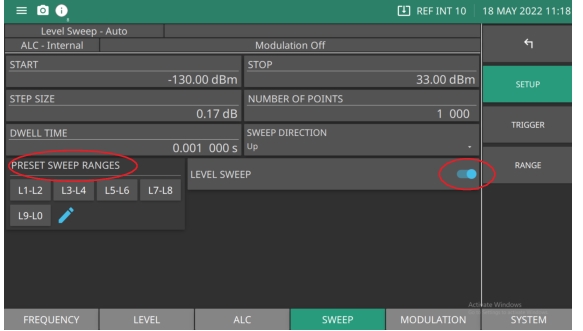
Set a pair of preset power level sweep range parameters to sweep: L1-L2, L3-L4, L5-L6, L7-L8, L9-L0. Edit the current start and stop power level parameter values.
Entering New Start/Stop Power Levels
To edit the current power level sweep range, press the START or STOP power level parameter. Pressing L1, L3, L5, L7 or L9 opens the start power level parameter and L2, L4, L6 L8, L0 opens the stop power level parameter.
Edit the open power level parameter using the cursor control keys or the rotary data knob. When you are finished, close the open parameter by pressing its menu edit soft key or by making another menu selection.
From the SETUP menu shown in Figure: SWEEP LEVEL SETUP Menu press the desired PRESET SWEEP RANGES button and then toggle the LEVEL SWEEP button on to start the power level sweep.
SWEEP LEVEL SETUP Menu
Setting SWEEP TYPE
Use the SWEEP TYPE menu to select a logarithmic or linear power level sweep and set the START and STOP power level parameters for each selected preset sweep range. Press SWEEP TYPE to display the Units menu and to select the power level units. When Log is selected, units are dBm or dBμV. When Linear is selected, units are mV. The units are displayed with the indicated power level to reflect your selection.
Analog Sweep (Option 6)
Analog sweep is available for the MG36221A and MG36241A models only. In analog sweep frequency mode, the MG36221A output frequency is swept between selected start and stop frequencies. Sweep width can be set from 1 MHz to the full frequency range of the signal generator. Sweep time can be set for any time in the range of 13 ms to 99 s. The lower frequency limit for analog sweeps is 10 MHz. When Option 6 is installed, CW Ramp and Markers are available. See CW RAMP Menu and Markers Menu.
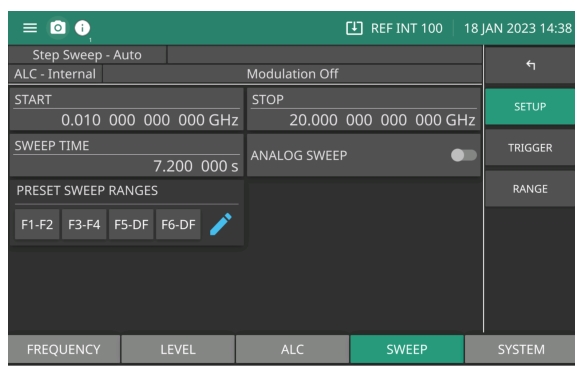
When the sweep width of the analog sweep is >100 MHz, the sweep is phase-lock corrected at both the start and stop frequencies and at each band switch point. When the sweep width is ≤100 MHz, only the center frequency is phase-lock corrected.The ANALOG SWEEP menu is shown in Figure: Analog Sweep.
To edit the current frequency sweep range, open either the start or stop frequency parameter field. In the display shown in Figure: STEP - SETUP Menu, pressSTARTopens the start frequency parameter. Press STOP opens the stop frequency parameter. Edit the open frequency parameters. When complete, close the open parameter using a termination key.
• Press F1-F2: Provides a frequency sweep between the start frequency, F1, and the stop frequency, F2.
• Press F3-F4: Provides a frequency sweep between the start frequency, F3, and the stop frequency, F4.
• Press F5-DF:Provides a symmetrical frequency sweep about the center frequency, F5. The sweep width is determined by the dF frequency parameter.
• Press F6-DF: Provides a symmetrical frequency sweep about the center frequency, F6. The sweep width is determined by the dF frequency parameter. The Delta Frequency can be applied to any F0-F9 frequency.
Selecting one of the preset sweep range parameters F1-F2, F3-F4, F5-F6 and DF (Delta Frequency).
Setting Sweep Time
To set the analog sweep time, press SWEEP TIME.
Edit the current sweep time using the cursor control keys, the rotary data knob, or enter a new sweep time using the key pad and appropriate termination key. To close the open sweep time parameter once you have set the desired sweep time, press SWEEP TIME or make another menu selection.
To access the Analog Sweep Trigger menu from this menu, press TRIGGER. Set one of three trigger modes:
The sweep trigger is selectable from the trigger menu. There are three modes of sweep triggering for analog and step frequency sweep—automatic, external, and single. Press the TRIGGER button to display the trigger types:
• Auto (Automatic): The sweep continually sweeps from its start frequency to its stop frequency with optimal retrace time.
• External: The sweep recurs when triggered by an external TTL-compatible clock pulse to the rear panel AUX I/O connector.
• Single: A single sweep starts when the trigger key is pressed. If a sweep is in progress when the key is pressed, it aborts and resets.
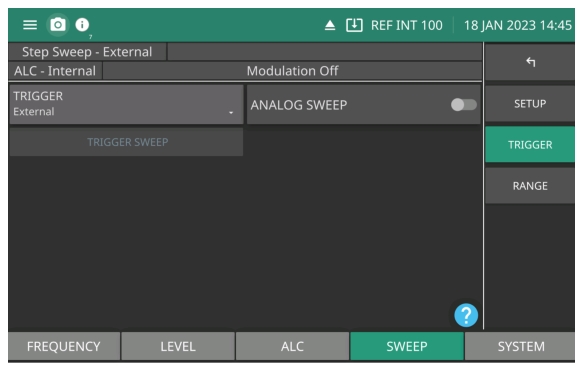
To access the Sweep Trigger menu (Figure: TRIGGER Menu) from either the Analog Sweep or Step Sweep menus, press: SWEEP | STEP | TRIGGER.
TRIGGER Menu
A message showing the sweep trigger mode selected appears on the right side of frequency title bar.
If you select the single sweep trigger mode, the menu display adds the menu soft key TRIGGER. Pressing TRIGGER starts a single sweep. If a single sweep is in progress, pressing TRIGGER causes the sweep to abort and reset.
RANGE Menu
The STEP RANGE menu provides frequency parameter range settings fro analog and step sweep modes. The RANGE menu is shown in Figure: RANGE Menu.
Press: SWEEP | STEP | RANGE
STEP- RANGE Menu
F1-F2
Frequency preset parameters. Sets as a pair when setting a sweep.
F3-F4
Frequency preset parameters. Sets as a pair when setting a sweep.
F5 dF
Frequency preset parameters. This sweep preset includes dF and delta Frequency preset.
F6-dF
Frequency preset parameters. This sweep preset includes dF and delta Frequency preset.
Analog Power Sweep (APS) (Option 16)
Analog Power Sweep Option 16 is available on all models.
In Analog Power Sweep mode, the RF output power is swept between a selected start and stop power over a selected period of time. Frequency remains constant, at the current CW frequency setting value. The step size is also constant, at 0.01 dBm. The number of points and dwell time per point are both calculated automatically. The power levels can extend to the minimum and maximum output power of the device, and the sweep time can be any time from 10 milliseconds to 99 seconds, though sweeps over a wide range may have a longer minimum sweep time.
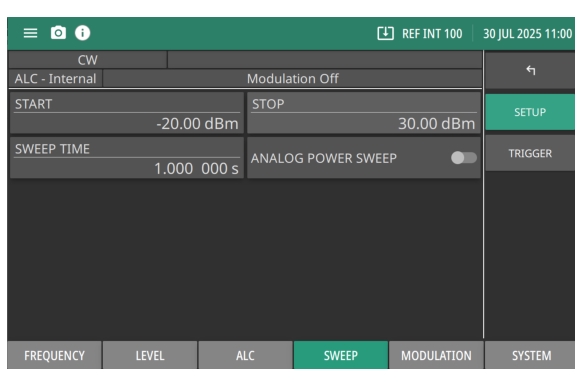
Analog Power Sweep can sweep much faster than a Step Sweep, and is significantly easier and more convenient to set up than a List Sweep. The Analog Power Sweep menu is shown in Figure: Sweep - APS Setup Menu.
Press SWEEP | APS.
SETUP
By default Setup menu is displayed after pressing APS menu.
Sweep - APS Setup Menu
START
Sets the start power.
STOP
Sets the stop power.
SWEEP TIME
Sets the sweep time.
ANALOG POWER SWEEP
Turn on the toggle to enable analog power sweep. It is off by default.
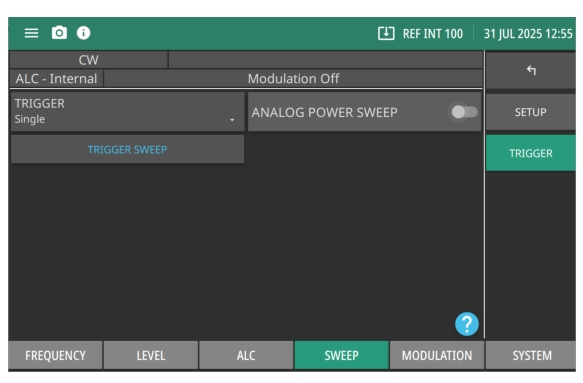
Press to display the trigger types: Auto, Single, External, Manual, and Remote shown in Figure: TRIGGER TYPES.
TRIGGER SWEEP
Trigger a single sweep. Enabled only in single sweep trigger mode. When TRIGGER is set to Manual Sweep, the TRIGGER POINT button is enabled. See List Mode Sweep Trigger Types.