The signal generator provides Amplitude Modulation (AM), Frequency Modulation (FM), Phase Modulation (ΦM), and Pulse Modulation (PM) of the output signal using modulating signals from either the internal AM, FM, ΦM, and pulse generators or external sources that are TTL-compatible. FM and ΦM can not be on at the same time; therefore, only the AM, FM or ΦM, and Pulse Modulation modes can be active simultaneously. The following paragraphs provide descriptions and operating instructions for each modulation mode.
Note
Your modulation capabilities are dependent on the instrument’s installed options. The following descriptions and procedures are presented to cover all of the possible instrument configurations.
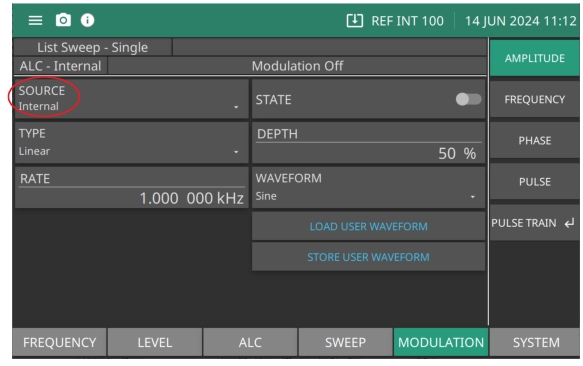
The Amplitude Modulation menu provides amplitude modulation of the output signal using a modulating signal from both the internal AM generator and an external source. The signal generator has two AM operating modes: Linear AM and Log AM. In Linear AM mode, sensitivity is continuously variable from 0 %/V to 100 %/V. The amplitude of the RF output changes linearly as the AM input changes. In Log AM mode, sensitivity is continuously variable from 0 dB/V to 25 dB/V. The amplitude of the RF output changes exponentially as the AM input changes.
Setting AM SOURCE
Press SOURCE to set the source of the modulating signal as Internal or External.
• Internal sets the modulating signal to the internal generator source.
• External sets the modulating signal to an external generator source connected to the rear panel AM IN BNC.
• Logarithmic: Displays the DEPTH button to set sensitivity in dB.
• Linear: Displays the DEPTH button to set sensitivity in %.
DEPTH
Numeric parameter active when AM Type is linear. Parameter is in percentage.
RATE
Edits the AM rate in Hz | kHz | MHz.
WAVEFORM
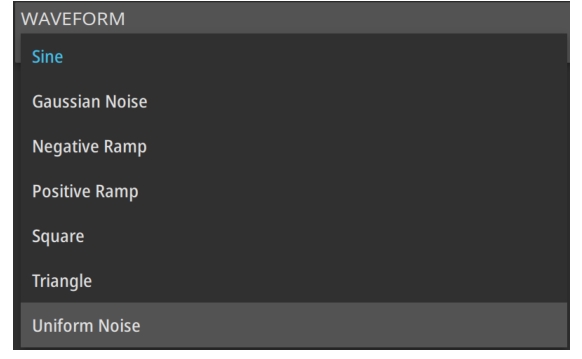
Select the internal AM waveform: Sine, Square, Positive Ramp, Negative Ramp, Gaussian Noise, Uniform Noise, Triangle.
LOAD USER WAVEFORM
Open the load dialog in the user defined location. Only available with Option 10.
STORE USER WAVEFORM
Open the save dialog in the user defined location. Only available with Option 10.
Note
Modulation status menus may display in this menu if previously left open. The examples in this manual are given relative to a system-reset state.
Setting TYPE (SOURCE Set to Internal)
Linear AM: Sets the modulation depth of the AM signal in the internal AM Linear mode. Depth is continuously variable from 0 %/V to 100 %/V. The amplitude of the RF output changes linearly as the AM input changes.
Logarithmic AM: Sets the modulation depth of the AM signal in the internal AM Log mode. Depth is continuously variable from 0 dB/V to 25 dB/V. The amplitude of the RF output changes exponentially as the AM input changes.
Setting TYPE (SOURCE Set to External)
Linear AM: Sensitivity is continuously variable from 0 PCT/V to 100 PCT/V. The amplitude of the RF output changes linearly as the AM input changes.
Logarithmic AM: Sensitivity is continuously variable from 0 dB/V to 25 dB/V. The amplitude of the RF output changes exponentially as the AM input changes.
Setting STATE
Press STATE to switch AM on or off. The Internal AM status display will reflect your selection as Internal On.
Setting RATE
Press RATE to open the AM Rate parameter, then edit the current value using the cursor control keys, rotary data knob, or enter a new value using the keypad and the appropriate terminator key. The AM rate range is 0.1 Hz to 1 MHz for sine wave and 0.1 Hz to 100 kHz for square, triangle, and ramp waveforms.
Note
Reduce Rate
This warning message is displayed when the AM Rate is set >100 kHz for a non-sine wave modulating waveform. Amplitude modulation of the output signal will continue but the modulating waveform may be distorted.
Setting AM WAVEFORM
Press WAVEFORM to access the Modulation Waveform menu as shown in Figure: AM Modulation WAVEFORM Menu. Set the modulating waveform from the internal AM generator for the internal modulation function as:
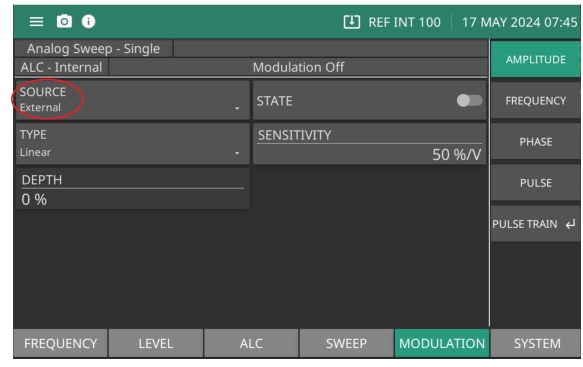
To provide amplitude modulation of the output signal using a modulating signal from an external source, first set up the external signal generator and connect it to the MG362x1A rear panel AM IN BNC connector.
This menu contains the external AM status window showing the current menu selections and the measured AM Depth. The AM depth measurement function measures the voltage of the external modulation signal and calculates the percentage modulation value.
• Logarithmic: Displays the DEPTH button to set sensitivity in dB.
• Linear: Displays the DEPTH button to set sensitivity in %.
SENSITIVITY
Available when SOURCE is set to External. Numeric parameter dB/V is active when AM Type is Logarithmic. Numeric value %/V is active when AM type is set to Linear.
DEPTH
Numeric parameter dB is active when AM Type is Logarithmic. Numeric value %/V is active when AM type is set to Linear.
Setting STATE
Press STATE to switch AM on and off. The External AM status display will display as External On or Off.
Note
ERR
This error message is displayed when the external AM modulating signal exceeds the input voltage range. The message “Reduce AM Input Level” also appears at the bottom of the AM status display. AM is turned off until the modulating signal is within the input voltage range.
Setting SENSITIVITY
Press SENSITIVITY to open the AM Sensitivity parameter, then edit the current value using the cursor control keys, rotary data knob, or enter a new value using the keypad and the appropriate terminator key. The AM Sensitivity range is 0 %/V to 100 %/V in Linear and 0 dB/V to 25 dB/V in Log. To close the open AM Sensitivity parameter, press SENSITIVITY or make another menu selection.
Setting DEPTH
Press DEPTH to open the AM Depth parameter, then edit the current value using the cursor control keys, rotary data knob, or enter a new value using the keypad and the appropriate terminator key.
Frequency Modulation
The two internal FM operating modes are Locked and Unlocked. In the Locked and Unlocked modes, frequency modulation of the output signal is accomplished by summing the modulating signal into the FM control path of the YIG phase-lock loop.
If Locked is set, the YIG phase-locked loop is used in synthesizing the FM signal. If Unlocked is set, the YIG phase-lock loop is disabled and the FM signal is obtained by applying the modulating signal to the tuning coils of the YIG-tuned oscillator.
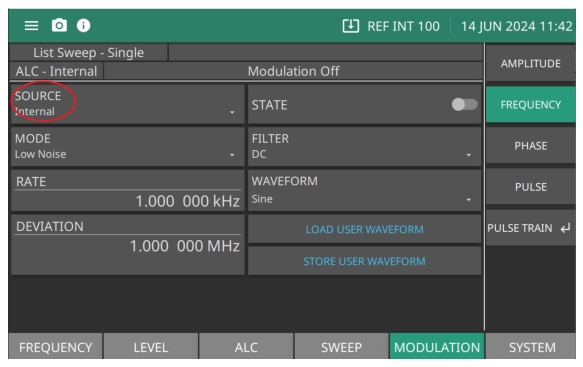
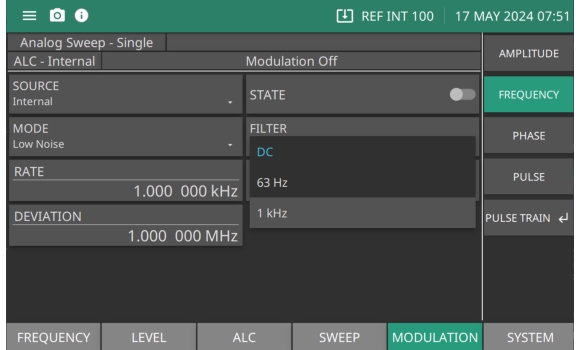
Press: MODULATION | FREQUENCY | SOURCE | Internal.
Internal Frequency Modulation Menu
SOURCE
Set Internal or External modulation.
STATE
Switch frequency modulation on or off.
MODE
Set to Low Noise or Wide (Unlocked).
FILTER
Set the internal filter to DC, 63 Hz, or 1 kHz.
RATE
Open the FM Rate parameter, then edit the current value using the cursor control keys, rotary data knob, or enter a new value using the keypad and the appropriate terminator key.
WAVEFORM
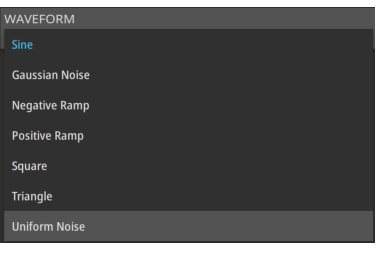
Select the internal FM waveform: Sine Wave, Square Wave, Positive Ramp, Negative Ramp, Gaussian, Uniform Noise, Triangle Wave.
DEVIATION
Set the modulation deviation of the FM signal for the internal FM function. Range is 10 Hz to 420000000 Hz. (Range is model dependent)
LOAD USER WAVEFORM
Open the load dialog in the user defined location.
STORE USER WAVEFORM
Open the save dialog in the user defined location.
Setting Internal FM Source
Press SOURCE Internal to select the internal FM generator as the modulating signal source.
Setting STATE
Press STATE to switch FM on or off.
Setting MODE
Press MODE to set the FM Mode to Low Noise or Wide (Unlocked). Locked sets the YIG phase-locked loop to synthesize the FM signal. If Unlocked is set, the YIG phase-lock loop is disabled and the FM signal is obtained by applying the modulating signal to the tuning coils of the YIG-tuned oscillator.
Setting Filter
Press FILTER sets the high pass filter passband start frequency for the FM signal applied to the FM external input. Set DC for DC coupled, 63 Hz for a 63 Hz high pass filter, 1 kHz for a 1 kHz high pass filter as shown in Figure: FM Filter.
FM Filter
Setting RATE
Press RATE to open the FM rate parameter, then edit the current value using the cursor control keys, rotary data knob, or enter a new value using the keypad and the appropriate terminator key. The FM rate range for all waveforms is 0.001 Hz to 10 MHz.
Setting WAVEFORM
Press WAVEFORM to access the Modulation Waveform menu as shown in Figure: Frequency Modulation Waveforms. Set the modulating waveform from the internal FM generator for the internal modulation function as:
• Gaussian Noise
• Negative Ramp
• Positive Ramp
• Square Wave
• Triangle Wave
• Uniform Noise
Frequency Modulation Waveforms
Setting DEVIATION
Press DEVIATION to open the FM Deviation parameter, then edit the current value using the cursor control keys, rotary data knob, or enter a new value using the keypad and the appropriate terminator key.
Frequency Modulation Set to External
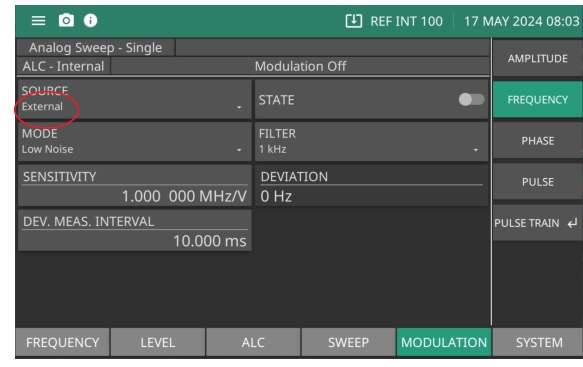
The Frequency Modulation SOURCE set to External provides the modulating signal from an external source connected to the rear panel FM IN BNC connector.
This menu contains the external FM status window that shows the current menu selections and the measured FM Deviation (The FM deviation measurement function measures the voltage of the external modulation signal and calculates the peak frequency deviation).
Range is -420000000 Hz/V to 420000000 Hz/V. (Range is model dependent)
DEVIATION
Set the modulation deviation of the FM signal for the internal FM function. Range is 10 Hz to 420000000 Hz. (Range is model dependent)
DEV. MEAS. INTERVAL
set the FM meter measuring interval. Range is 1e-06 seconds to 2 seconds.
Setting STATE
Press STATE to switch external FM on and off.
Setting MODE
Sets the synthesis mode employed in generating the FM signal as Locked Low-Noise FM or Unlocked FM
If Locked low-noise is set, the YIG phase-locked loop is used in synthesizing the FM signal. If Unlocked is set, the YIG phase-lock loop is disabled and the FM signal is obtained by applying the modulating signal to the tuning coils of the YIG-tuned oscillator.
Setting FILTER
Press FILTER sets the high pass filter passband start frequency for the FM signal applied to the FM external input. Set DC for DC coupled, 63 Hz for a 63 Hz high pass filter, 1 kHz for a 1 kHz high pass filter as shown in Figure: FM Filter.
Setting SENSITIVITY
Press SENSITIVITY sets the FM sensitivity for the external FM function. The FM Sensitivity range is –420000000 Hz/V to 420000000 Hz/V. (Range is model dependent)
Setting DEVIATION
Press DEVIATION to open the FM Deviation parameter, then edit the current value using the cursor control keys, rotary data knob, or enter a new value using the keypad and the appropriate terminator key.
Phase Modulation
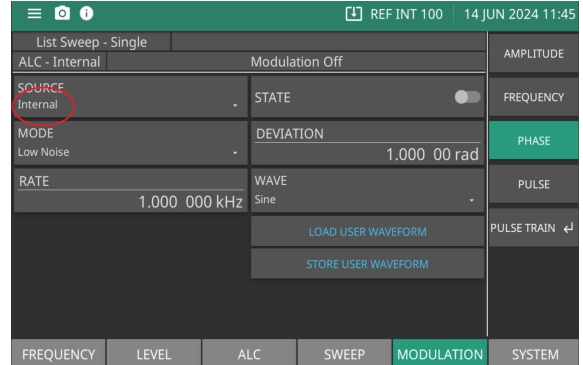
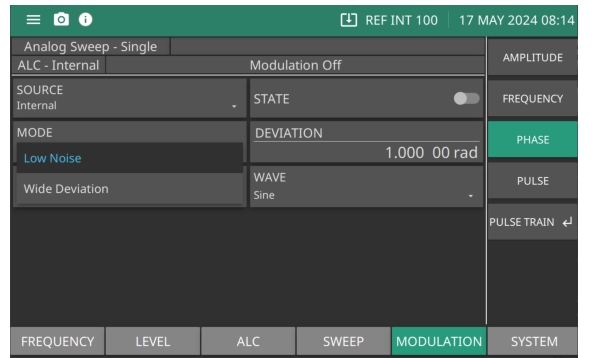
The MG362x1A can provide phase modulation (ΦM) of the output signal using modulating signals from either its internal ΦM generator or an external source.
The MG362x1A has two ΦM operating modes—Narrow ΦM and Wide ΦM. In Narrow ΦM mode, the maximum ΦM deviation is the lesser of ±3 radians or ±5 MHz for DC to 8 MHz rates. In Wide ΦM mode, the maximum ΦM deviation is the lesser of ±400 radians or ±10 MHz for DC to 1 MHz rates.
Note
FM and ΦM can not be active simultaneously. FM and ΦM share the same rear panel input connector and internal signal generator.
The Low Noise ΦM mode allows a deviation range of 0.00001 radians to 25.1 radians, and a sensitivity range of ±0.00001 RADS/V to ±25.1 RADS/V. The Wide deviation ΦM mode allows a deviation range of 0.001 radians to 3220 radians, and a sensitivity range of -0.001 RADS/V to -3220 RADS/V OR +0.001 RADS/V to +3220 RADS/V.
Setting Rate
Press RATE to open the ΦM Rate parameter, then edit the current value using the cursor control keys, rotary data knob, or enter a new value using the keypad and the appropriate terminator key. The ΦM Rate range is 0.0001 Hz to 10 kHz.
Setting Waveform
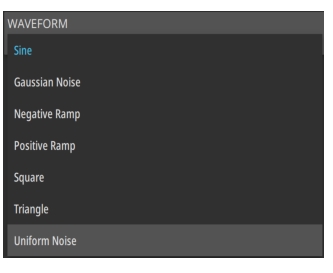
Press WAVEFORM to access the Modulation Waveform Selection menu Figure: Phase Wave Selection. This menu displays the modulation waveforms that are available from the ΦM generator.
Phase Wave Selection
PHASE Modulation Set to External
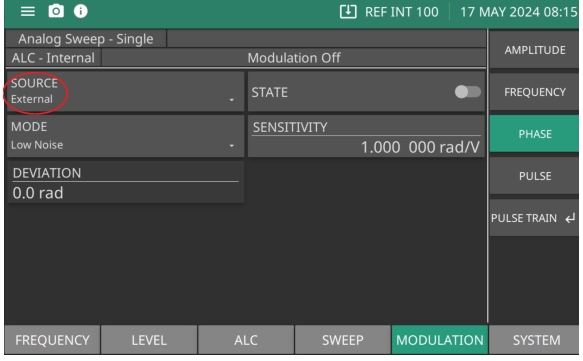
To provide phase modulation of the output signal using a modulating signal from an external source, first set up the external signal generator and connect it to the MG362x1A rear panel FM IN BNC connector.
This menu contains the external ΦM status window that shows the current menu selections and the measured ΦM deviation (The ΦM deviation measurement function measures the voltage of the external modulation signal and calculates the peak frequency deviation).
Setting Sensitivity and Deviation
Press SENSITIVITY to open the ΦM sensitivity parameter. Edit the current value using the cursor control keys, rotary data knob, or enter a new value using the keypad and the appropriate terminator key. The Low Noise ΦM mode allows a deviation range of 0.00001 radians to 25.1 radians, and a sensitivity range of ±0.0000391 RADS/V to ±25.13 RADS/V. The Wide deviation ΦM mode allows a deviation range of 0.001 radians to 3220 radians, and a sensitivity range of -0.001 RADS/V to -3220 RADS/V OR +0.001 RADS/V to +3220 RADS/V.
Pulse Modulation
The MG362x1A provides pulse modulation of the output signal using modulating signals from either its internal pulse generator or an external source.
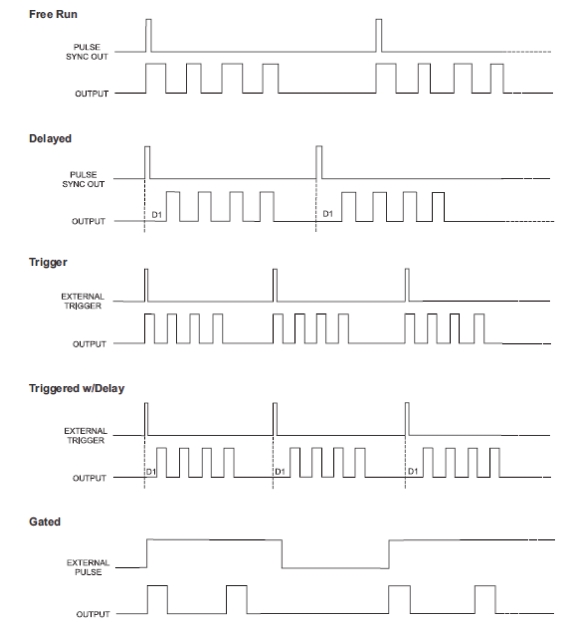
The internal pulse generator can be internally triggered, externally triggered, internally and externally triggered with delay. There is also a composite mode in which an external pulse is summed with the internal pulse to pulse modulate the output signal.
Whenever the internal pulse generator is internally triggered, a TTL-compatible signal that is synchronized to the internal pulse modulation output is available at the rear panel PULSE SYNC OUT connector.
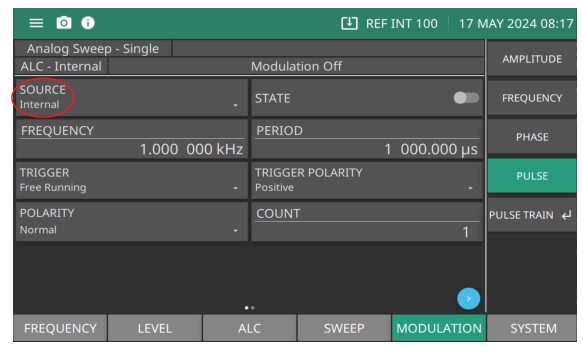
Press SOURCE to set the source of the modulating signal as Internal or External.
• Internal pulse generator provides a 100 MHz clock rate that produces higher resolution pulses and allows higher Pulse Repetition Frequencies (PRFs).
• External signals or pulses to trigger or gate the internal pulse generator can be applied to the rear panel PULSE TRIGGER IN connector.
Blue Arrow scrolls to the next page and shows the Pulse With Delay menu shown in Pulse Width-Delay Menu.
Setting Period and (PRF) FREQUENCY
The PERIOD and FREQUENCY (PRF) buttons are interactive. Changing one of these parameters will change the other. Edit the current value using the cursor control keys, rotary data knob, or enter a new value using the keypad and the appropriate terminator key. The frequency (PRF) range is 0.6 Hz to 25,000,000 Hz.
Press PERIOD to set the pulse period of the internal pulse generator to the value entered. Selecting Pulse Period represents the pulse period as time. The pulse period range is determined by the pulse generator clock rate. The period range is 1e-07 to 42 seconds.
Pulse Width-Delay Menu
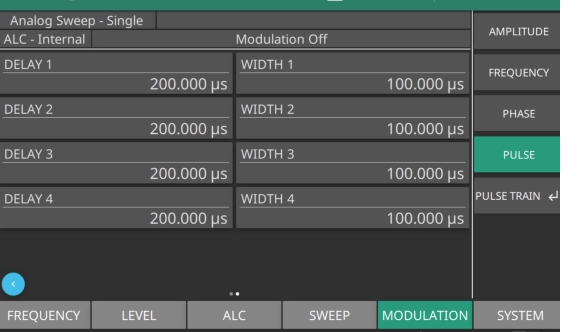
Pressing the blue chevron in the lower corner of the screen as shown in Figure: Internal Pulse Menu displays the Pulse Width/Delay List menu Figure: Pulse Width-Delay Menu of the current Pulse Width (W1–W4) and Delay parameter settings.
Pulse Width-Delay Menu
Delay 1-4
Set the pulse delay for each pulse count selected from the Internal Pulse menu Pulse SOURCE Set to Internal. Range is 0 s to 42 s.
Width 1-4
Set the pulse width for each pulse count selected from the Internal Pulse menu Pulse SOURCE Set to Internal. Range is 1e-08 s to 42 s.
To change the current value of a parameter, use the cursor control keys to select the parameter, then press and enter the current value using the cursor control keys, rotary data knob, or enter a new value using the keypad and the appropriate terminator key. Press a terminator key to close the open parameter.
Setting Pulse Count
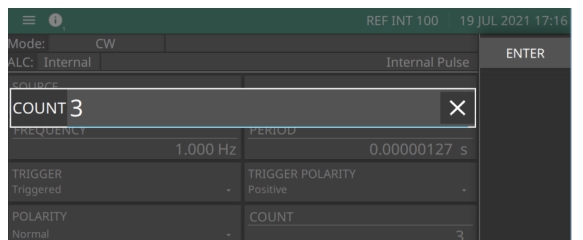
Press COUNT to type 1 (Single), 2 (Doublet), 3 (Triplet), or 4 (Quadruplet) pulse mode. Pulse COUNT of 3 (Triplet) is shown in Figure: Pulse Count. Press ENTER. The Internal Pulse Status display will show your selection.
Pulse Count
Setting Count
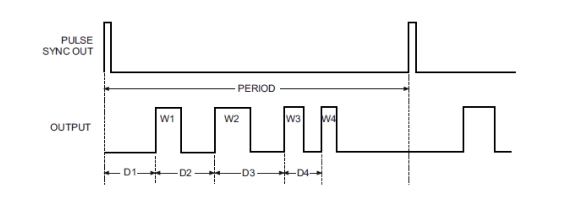
Press COUNT to set the number of pulses generated by the internal pulse generator for each period of the pulsed waveform. The internal pulse generator has four pulse modes. Range is 1-4. Set COUNT to display 1 (single), 2 (doublet pulse), 3 (triplet pulse), and 4 (quadruplet pulse). Individual pulse widths WIDTH 1 (W1), WIDTH 2 (W2), WIDTH 3 (W3), and WIDTH 4 (W4)and delays DELAY 1 (D1), DELAY 2 (D2), DELAY 3 (D3), and DELAY 4 (D4) can be set for each of the pulses in a mode as shown in Figure: Pulse Mode.
Pulse Mode
Set TRIGGER
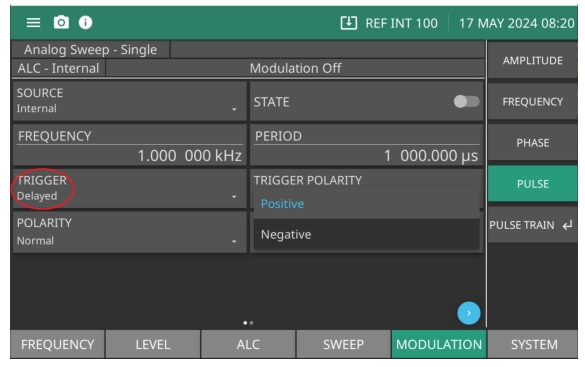
From the additional Internal Pulse Status menu, press TRIGGER to access the Trigger Mode menu display shown in (Figure: Trigger Mode Menu).
Refer to and the descriptions below for the types of modulation waveforms.
Free Running
The pulse generator produces pulses at the internal PRF. Single, Doublet, Triplet, or Quadruplet pulse modulation waveforms at the internal pulse repetition rate. Pulse delay is not available in this trigger mode.
Gated
an external pulse gates the internal pulse generator on and off. When gated on, the pulse generator produces a single pulse at the internal PRF.
Delayed
The pulse generator produces Single, Doublet, Triplet, or Quadruplet pulse modulation waveforms at the internal pulse repetition rate.
Triggered
The pulse generator is triggered by an external trigger to produce Single, Doublet, Triplet, or Quadruplet pulse modulation waveforms. Pulse delay is not available in this trigger mode.
Trigger with Delay
The pulse generator is triggered by an external trigger to produce Single, Doublet, Triplet, or Quadruplet pulse modulation waveforms delayed by pulse delay.
Composite
An external pulse triggers the internal pulse generator and also pulse modulates the output signal. The internal pulse generator produces a single pulse delayed by pulse delay1, which also pulse modulates the output signal.
Polarity
Press POLARITY to select the polarity of the signal that turns the RF on during pulse modulation, as follows:
Normal:
Specifies positive-true operation; a TTL-high level will turn on the RF output signal.
Inverted:
Specifies negative-true operation; a TTL-low level will turn on the RF output signal.
Trigger Polarity
Selects whether the internal pulse generator is triggered on the rising edge (positive) or falling edge (negative) of the external trigger signal.
Modulation Waveforms
PULSE Modulation Set to External
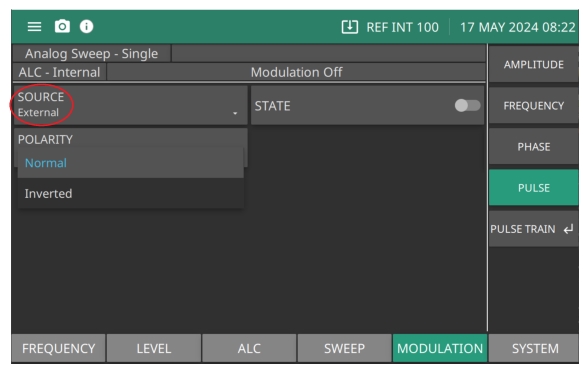
To provide pulse modulation of the output signal using a modulating signal from an external source, first set up the external pulse generator and connect it to the MG362x1A rear panel PULSE IN BNC connector.
Press POLARITY and set the polarity of the signal that turns the RF on during pulse modulation.
• Normal specifies positive-true operation; a TTL-high level will turn on the RF output signal.
• Inverted specifies negative-true operation; a TTL-low level will turn on the RF output signal.
For proper operation, the period of the external pulse must be greater than the sum of the pulse repetition rate and pulse width of the internal pulse modulation waveform. To prevent relative timing jitter, the external gating pulse source can be synchronized with the internal pulse generator by using the 10 MHz REF OUT signal output (MG362x1A rear panel) as a frequency reference for the external generator.
Pulse Train (Option 25)
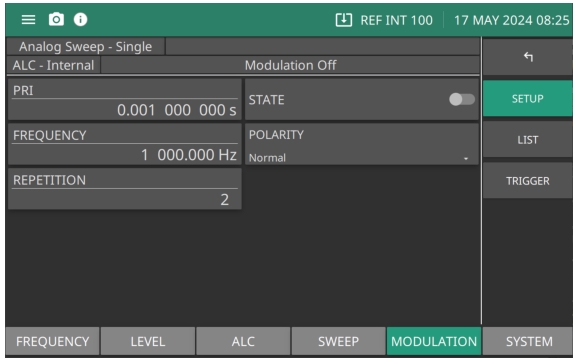
The MG362x1A provides the pulse train generator option to simulate complex pulse radar signals. Pulse train is a file based data entry. Import an external pulse pattern file either from a USB memory stick or pluggable SDIO card. The external file should accommodate pulse pattern entries up to 2048. Each entry has three parameters: Pulse ON (in µS), Pulse OFF (in µsec) and the number of repetitions up to 65,535. The Pulse Train menu is shown in Figure: Pulse Train Menu.
Pulse Train Menu
PRI
Set the pulse repetition interval (PRI) value. Range is 1µs to 42s
State
Set the pulse state to on or off
Frequency
Set the pulse frequency with the pulse repetition to set the PRI. (The number of pulses of a repeating signal in a specific time)
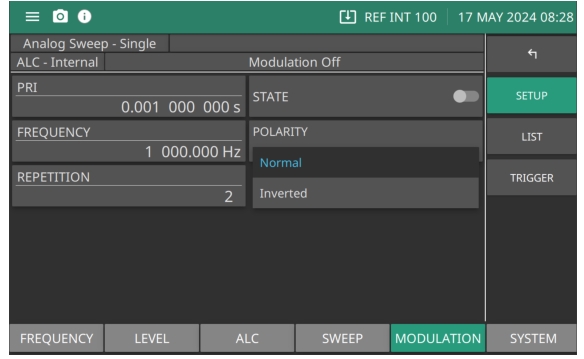
Polarity
Set the pulse polarity as Normal or Inverted.
Repetition
Set the repetition rate. The repetition rate is the number of emitted pulses per second. Range is 2s to 100s
Pulse Polarity
Set the Polarity to Normal or Inverted as shown in Figure: Pulse Polarity. When set to Inverted the polarity has rising edges and slopes becoming falling edges and slopes. As well, falling edges and slopes become rising edges and slopes.
Pulse Polarity
Pulse Train LIST
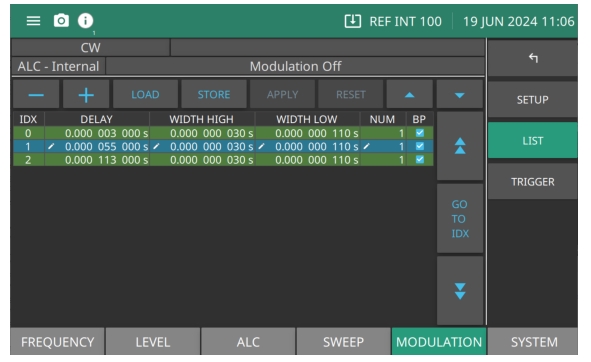
The MG362x1A supports a file based data entry for functionalities such as List mode as shown in Figure: Pulse Train List Menu, The file format can be imported in to or out of popular spreadsheet programs such as excel. User can edit the entries in the file through the GUI. Each parameter can be edited by selecting the parameter in the list and then entering a value.
Pulse Train List Menu
–
Click an index entry to highlight it as shown and press – to remove the entry from the List
+
Press to add an entry to the list.
LOAD
Press to open the import dialog.
STORE
Press to open the save dialog.
APPLY
Press to apply the pulse parameter settings made in the list.
RESET
Press to discard current edits.
or
Scroll up or down per row.
GO TO IDX
Press double-arrow up to scroll up or double-arrow down to scroll down per page.
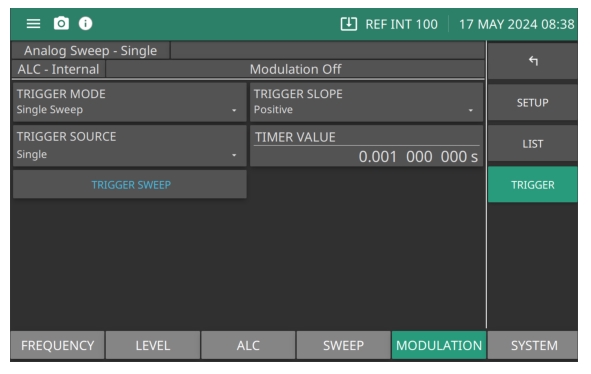
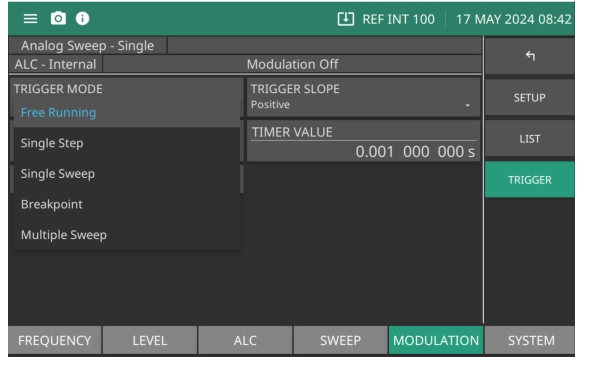
Set to single step. Press TRIGGER SWEEP to step forward one pulse step.
Single Sweep
Set to single sweep. Each press of TRIGGER SWEEP sweeps forward one sweep.
Breakpoint
Sets the indices of breakpoints for the pulse burst system. The sweep type must be set to breakpoint for the breakpoints to have an effect. The data should be given as a comma-separated list of ascending indices, starting from 1, and ending at 2047. For example, a breakpoint on 1 will pause before the second burst, and on 2047 it will pause before the last burst.
Multiple Sweep
Add multiple sweep intervals of a set sweep pattern.
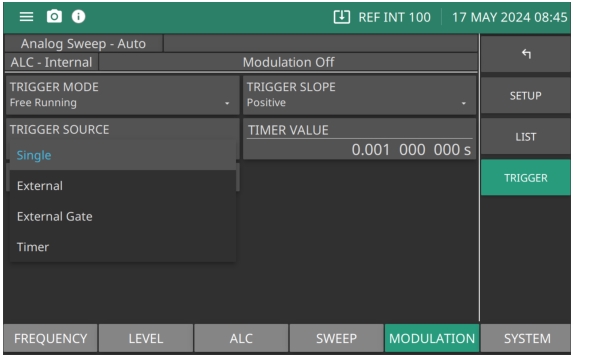
Pulse Train TRIGGER SOURCE Menu
Pulse Train TRIGGER SOURCE menu
Single
Press TRIGGER SWEEP provides a single-burst.
External
Sets the rear panel external pulse input as the trigger when TRIGGER SWEEP is pressed.
External Gate
Press TRIGGER SWEEP sets the external pulse gates of the internal pulse generator on and off. When gated on, the pulse generator produces a single-burst at the internal PRF.
Timer
Controls the delay between pulse burst triggers. Range is 10µsec to 100sec.
Phase Tracking
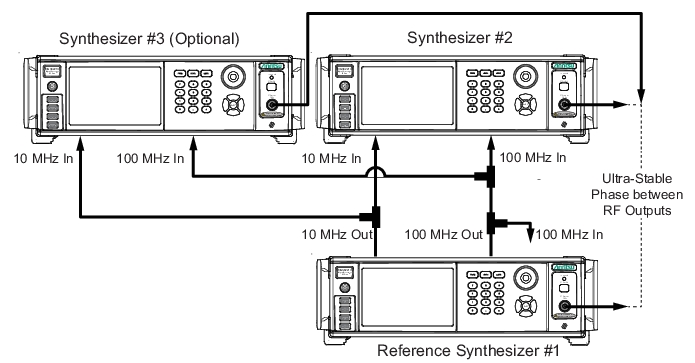
Phase tracking enables up to three MG362x1A units to phase track with a very high degree of stability. Phase tracking provides the following additional rear panel connectors to link internal reference signals together:
• 100 MHz Reference Output: Provides the reference signal to drive up to two other MG362x1A instruments.
• 100 MHz Reference Input: Accepts the 100 MHz reference signal from another MG362x1A. To enable two MG362x1A instruments to phase track with high stability, connect the instruments as shown in Figure: Phase Tracking Connections of Multiple MG362X1A Instruments using 50 Ω BNC cables and a 50 Ω BNC Tee:
The 100 MHz loopback must be connected on the reference synthesizer as shown. The above adjustment of phase will work successfully when generators are set to the same frequency or frequencies that are harmonically related. The frequencies must be set in advance of making all the adjustments of phase and if the frequencies are subsequently changed, then the process of phase adjustment must be repeated.
Phase Tracking Connections of Multiple MG362X1A Instruments
Once connected as shown in Figure: Phase Tracking Connections of Multiple MG362X1A Instruments, connect an oscilloscope channel to each of the RF outputs from the signal generators to display the initial phase difference between the RF signals. Use the Phase Offset Menu, adjust the phase offset of one of the units to achieve the desired phase relationship as shown on the oscilloscope. Once the desired phase relationship has been achieved, the Phase Offset value may be zeroed. This will not affect the phase shift of the RF output, but will establish the currently set phase as the reference value for all future entries of Phase Offset.
Note
The 100 MHz loopback must be connected on the reference synthesizer as shown. The above adjustment of phase will work successfully when generators are set to the same frequency or frequencies that are harmonically related. The frequencies must be set in advance of making all the adjustments of phase and if the frequencies are subsequently changed, then the process of phase adjustment must be repeated.