 |
|
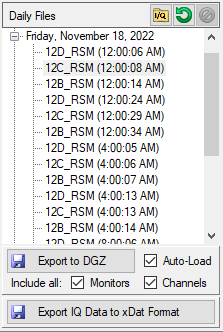
 | IQ File Folder Set an IQ data folder. |
 | Refresh Refresh the file list. |
-  | Delete: The delete button will be grayed for individual capture files and is available only for deleting the entire daily file. |
 | Export to DGZ Export selected files from the Daily Files List to Anritsu DGZ format. |
 | Auto-Load For single file exports, load for normal Playback and Analysis. For multiple files, load for Synchronized Playback |
 | Include All Check to Export from the same monitor at each channel in the same capture cycle as the selected file. |
 | Export IQ Data to xDat Format Export selected files from the Daily Files List to xDAT format. |