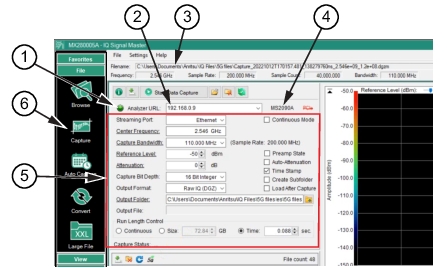
Use the Capture menu to obtain 5G data from a stored .dgzm file.as shown in Figure: Capture Menu.
Capture Menu
1. URL Connected Indicator
2. URL IP Address
3. Loaded File
4. Displays the Analyzer connected through the indicated IP Address
5. Set up Parameters
6. Capture Menu
1. Click the File menu.
2. Load the .dgzm file. The filename appears in the Filename field.
3. Set up the capture parameters such as Center Frequency, Center bandwidth, Reference Level and any settings required for the 5G analysis.
4. Type the URL of the spectrum analyzer into the URL field. The URL connected indicator will turn green when connected. The model number of the spectrum analyzer will display to the right of the URL field.