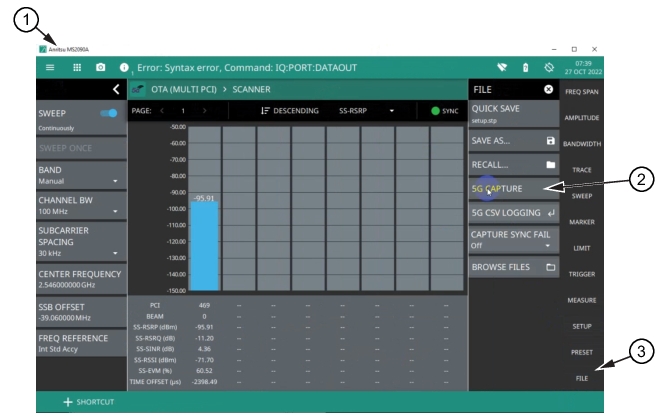
Using an MS2090A to create IQ data and transfer to the MX280005A IQ Signal Master. Once data parameters are set up on the MS2090A, the data file created in the MS2090A can be exported to the MX280005A software to perform 5G analysis.
Pull into to MX280005A IQ Signal Master Software
MS2090A 5G Capture Menu
1. Anritsu MS2090A Spectrum Analyzer
2. 5G Capture Button
3. File Menu
To import IQ data for a MS2090A for 5G Frame analysis:
2. Type the URL of the spectrum analyzer into the Capture menu URL field. The URL connected indicator will turn green when connected. The model number of the spectrum analyzer will display to the right of the URL field.
3. Press the File button on the MS2090A spectrum analyzer to display the 5G CAPTURE menu.
4. Press 5G CAPTURE to import the data to the MX280005A software program. Saves a 60 ms capture length of data that will be sent to the MX280005A IQ Signal Master for 5G analysis.