The front panel setups are stored in non-volatile memory. A Factory Reset is required to erase the contents of the setups and reprogram them with default data.
Note
The Factory Reset function overwrites all information stored in the non-volatile memory with default values. This includes the table of 2000 frequency/power level sets used for the list sweep mode and the five power-offset tables used for the user level flatness correction function.
To perform a Reset All
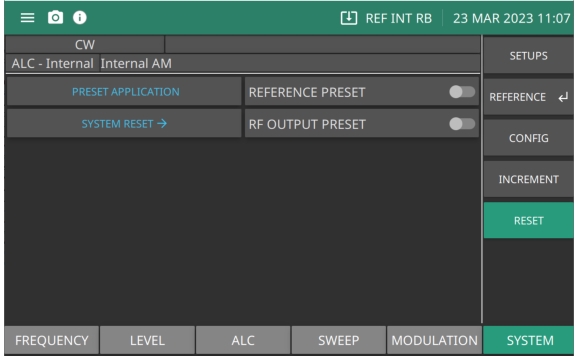
Press: SYSTEM | RESET | SYSTEM RESET | RESET ALL
RESET ALL will perform a Factory Reset and delete all user files and system files from the internal memory. The instrument will reset to a default state. For a description of the RESET menu, see RESET Settings.
RESET Menu
PRESET APPLICATION
Performs a system reset. Switch REFERENCE PRESET On or Off
SYSTEM RESET
Provides access to FACTORY RESET, FILE RESET. and RESET ALL. Switch RF OUTPUT PRESET On or Off. The function of these buttons are described in RESET Settings.
REFERENCE PRESET
Set to reinitialize all MG362x1A reference inputs and outputs.
RF OUTPUT PRESET
Switch to set RF on or off after a preset is performed.