 |
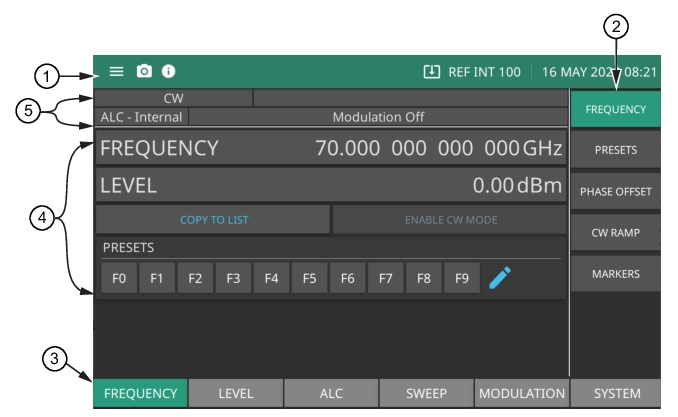
1. See Title Bar. 2. Menus are used to configure the main menu measurement settings: FREQUENCY, LEVEL, ALC, SWEEP, MODULATION and SYSTEM and to enable measurement modes and views. 3. See Main Menu Buttons. 4. See Entering Data. 5. See Status Area. |
|
1. See Title Bar. 2. Menus are used to configure the main menu measurement settings: FREQUENCY, LEVEL, ALC, SWEEP, MODULATION and SYSTEM and to enable measurement modes and views. 3. See Main Menu Buttons. 4. See Entering Data. 5. See Status Area. |
 |
1. Press the System Menu to display the instrument model and its serial number. The System Menu also consists of System Information, Settings, Files and Diagnostics menus. 2. Press the camera icon to capture a screen shot of the current display. The image file is saved in PNG format with the following naming scheme: screenshot_yymmdd_hhmmss.png (year, month, day, hour, minute, second). Using the SCREENSHOT Settings, you can set the screen capture region, color theme, annotations, and destination directory. 3. Notifications are generated when an error is detected or an activity such as a screen shot has taken place. The number of unread notifications appears next to the icon. The notification area is where all dynamic notifications are presented. These notifications are generally information messages to the user and not hardware failure messages. Press the icon to display the Notifications list. 4. Displayed when a USB device is attached. To ensure the device or its data does not become corrupted, press this icon to eject the USB device before it is unplugged from the USB port. This icon is also displayed when WEB UPDATES toggle is turned on and a firmware update is available on the company website. Note that it is only possible if the instrument is connected to the Internet. 5. Press Frequency Reference icon to open standard 100 MHz menu under Reference submenu. Refer to “REFERENCE Menu” on page 3‑101 for detailed information. 6. The right side of the instrument title bar displays the system date and time. Pressing this field opens the DATE TIME Settings. |
 |
FREQUENCY Contains the frequency control settings: FREQUENCY, and PRESETS menus. See “FREQUENCY Menu” on page 3‑3. LEVEL: Contains the level control settings: LEVEL, SETUP, ATTENUATOR, OFFSET, and PRESETS menus. See “LEVEL Menu” on page 3‑12. ALC Contains the Automatic Level Control (ALC) control settings: LOOP CONTROL, POWER SEARCH, and USER CAL menus. See “ALC Menu” on page 3‑27. SWEEP Contains the Sweep menu: SUMMARY, STEP, LIST, and LEVEL. See “Sweep Menu” on page 3‑42. MODULATION Contains the Modulation control settings: AMPLITUDE, FREQUENCY, PHASE, and PULSE menus. See “Modulation” on page 3‑69. SYSTEM Contains the System menu control settings: SETUPS, REFERENCE, CONFIG, INCREMENT, and RESET menus. The REFERENCE menu contains the reference oscillators calibration menu. See “SYSTEM Menu” on page 3‑99. |
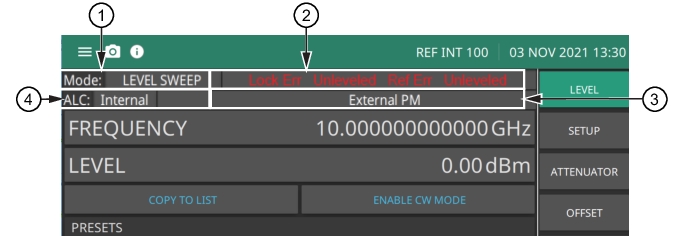 |
1. Sweep Mode Panel 2. Error Message Panel 3. Modulation Mode Panel 4. ALC Mode Panel |
 |